Venn Diagram Charts Explained: Types, Examples, and Uses

What do these groups share, and what belongs to only one? Venn diagram charts answer that question. In this article, you'll learn how to build them, what data you need, and why three circles are the practical limit before readability falters. You'll also find out the most common misreads and which alternatives work better when Venns fall short.
Key takeaways about Venn diagrams
Here are the key points to help you decide when a Venn diagram is the right fit.
- Use this chart when: You're comparing two or three categorical sets and overlap matters more than exact numbers
- Avoid this chart when: You need precise counts, proportional accuracy, or you have more than three sets
- Primary decision supported: Identifying which items belong to multiple groups versus which stay unique to one
- Most common misuse: Assuming circle size reflects quantity (it almost never does)
- Best alternative when this fails: UpSet plot for four or more sets, or a simple table when precision matters
What is a Venn diagram chart
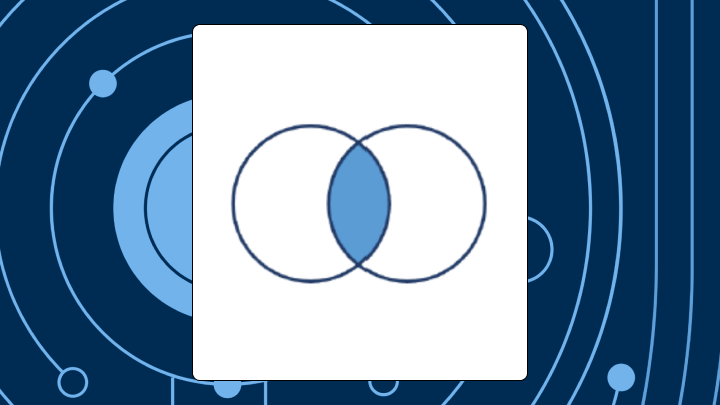
A Venn diagram has overlapping circles—that's the core mechanic. Each circle represents one set of items. Where circles overlap, you see items belonging to multiple groups at once. Where they don't overlap, you see items unique to just one group.
People reach for Venn diagrams because they answer the question everyone asks at some point: "How much do these two segments overlap?" Think shared customer cohorts, overlapping campaign audiences, co-occurring behaviors, or even intersecting key performance indicators (KPIs) that different teams both claim.
One important thing to keep in mind: in a standard Venn diagram, the size of each circle doesn’t represent quantity. A larger circle doesn’t mean more items; it’s simply a visual convention. That’s easy to misread, though. Stakeholders often assume the biggest circle contains the most records. Gartner has identified data literacy as a major barrier to analytics success, and this is a good example of why. Misinterpreting chart encodings happens all the time, even in otherwise well-designed visuals.
Separate from circle size, note that the space outside all circles matters, too. That's where items belonging to none of your sets live. In a marketing context, this might be customers who haven't engaged with any of your campaigns. Sometimes that's the most actionable group of all.
Data requirements for a Venn diagram chart
Most tools expect you to bring pre-calculated counts for each region, not raw transaction data. Starting from a customer relationship management (CRM) export or database table? You need to create membership flags first.
Teams can get slowed down here. The overlap question comes from Sales, Marketing, Finance, Operations, and compliance, but the data often lives in different systems. Joining, deduplicating, and keeping definitions consistent is usually the real work. Gartner estimates that poor data quality costs organizations $12.9 million per year on average. That number underscores why inconsistent set definitions (where "purchased in last 90 days" means something different in each system) feed directly into wasted resources and flawed analysis.
Your data needs these elements for a strong Venn diagram:
- Must-have fields: a unique identifier (customer ID, SKU, record key) and boolean columns showing membership in each set
- Nice-to-have fields: category columns for filtering, timestamps if membership changes over time
- Minimum viable shape: at least two sets with meaningful records in each region
Here's what a minimum data set looks like:
| Customer_ID | Email_Subscriber | Purchased_Last_90_Days |
|---|---|---|
| 001 | TRUE | TRUE |
| 002 | TRUE | FALSE |
| 003 | FALSE | TRUE |
| 004 | FALSE | FALSE |
From this, you calculate counts: email only, purchased only, both, neither. An Excel COUNTIFS formula (conditional counting) or a SQL query with CASE WHEN (conditional logic) can handle this quickly.
If you're building the dataset from multiple sources (like a CRM plus a marketing automation platform, or CRM plus enterprise resource planning (ERP)), you typically also need:
- a deduplication rule (so one customer does not become three customers)
- a consistent segment definition (so "purchased in last 90 days" means the same thing on every dashboard)
In governed BI environments, people often handle that consistency with reusable metrics and a semantic layer, so the Venn diagram chart logic is defined once and reused instead of being rebuilt and rechecked for every ad hoc request. One scenario where this chart breaks down: when one set dominates everything. If 98 percent of your records fall into the intersection, the "unique" regions become visually tiny but statistically meaningless.
When to use a Venn diagram chart (and when not to)
What do these groups share, and what's unique to each? That's the question this chart answers well. It struggles with how many and how much.
Use the Venn when you have two or three categorical sets and want to highlight overlap. It works when your audience cares about membership (who qualifies?) more than magnitude (how many?). Non-technical stakeholders tend to grasp overlapping circles intuitively, even when set notation would confuse them.
The Venn diagram is also a nice "strategic clarity" visual for leaders. If an executive is trying to see where segments converge and where they diverge (cross-sell overlap, shared budget impact, overlapping KPI ownership) a Venn diagram chart gives them the picture without a long explanation.
However, avoid it when you have four or more sets. A four-circle Venn creates 15 regions. Most teams cannot parse that quickly in a meeting. Also skip it when exact counts drive the decision, when proportional accuracy matters and you lack the right tools, or when one set is nearly a perfect subset of another.
If you use it anyway despite these constraints, expect questions about what the sizes mean. Expect requests to add numbers to every region, which clutters everything. Expect confusion when intersections turn up empty.
A quick decision flow helps here. First, count your sets. More than three? Stop and use an UpSet plot. Second, do you need exact counts? Use a table. Third, is one set a subset of another? A nested diagram or even a sentence works better.
How a Venn diagram works and common misreads
Reading this chart correctly follows a specific order. Start by identifying what each circle represents. Then look at the overlapping region first, the intersection where items meet multiple criteria. Next, scan the non-overlapping portions for exclusive groups. Finally, check the area outside all circles for items in neither set.
Viewers often assume bigger circles mean more items, but, again, standard Venn diagrams do not work that way. They may also read an empty intersection as missing data, when it usually just means the sets do not overlap.
With three-circle versions of the Venn diagram, overcounting happens constantly. The center region (where all three overlap) sometimes gets mentally added twice when people try to sum up the various two-way intersections. And the space outside all circles is often ignored entirely, even when it represents the most important population.
The mental model a Venn diagram imposes
This chart forces you to think about membership, not magnitude. The implicit question becomes: does this item belong to one group, another, both, or neither? That framing works beautifully for qualification decisions. It fails for allocation decisions. If your stakeholder's next question is "how many?" or "by how much?", the Venn has already missed the point.
Venn diagram variations
Two-circle Venn diagram
This is the simplest version. Two overlapping circles create three regions (A only, B only, both) plus an optional fourth (neither). Use it when comparing two segments, two criteria, or two time periods.
Three-circle Venn diagram (triple Venn)
A three-circle Venn has seven regions. The center, where all three overlap, often holds the most interesting insight. It also appears smallest visually, which can cause people to underweight its importance. And honestly, that's the part most guides skip over. Validation check: Sum all seven regions. The total should equal your record count. If it doesn't, something went wrong in data prep.
Proportional-area Venn diagram
Standard Venns are symbolic. Proportional-area variants scale circle size and overlap area to reflect actual counts. Use this when stakeholders will interpret size as quantity regardless of what you tell them, and when you have tools that support it.
Fair warning: Proportional accuracy is mathematically impossible for some three-set configurations. The areas cannot all be correct simultaneously. Tools like eulerr in R or matplotlib-venn in Python attempt best-fit approximations. Do not try building these manually in PowerPoint. The geometry simply will not work out.
Euler diagram vs Venn diagram
An Euler diagram looks similar but omits regions with no members. If two sets don't overlap at all, an Euler shows two separate circles. A Venn would still show them overlapping with zero in the intersection.
Use Euler when some intersections are logically impossible or when you want to reduce clutter. Use Venn when you want to explicitly show that an overlap exists but currently has zero members.
Four-circle Venn diagrams and beyond
A four-circle version has 15 regions. Five circles: 31 regions. Six circles: 63. At this scale, the visual becomes unreadable.
For four or more sets, pivot to alternatives. An UpSet plot displays intersections as a matrix with bar charts for counts. It scales cleanly to dozens of sets, and with thousands of academic citations, it's a widely used approach for visualizing multi-set intersections. That adoption rate signals something important: when practitioners need to visualize complex set relationships, many have moved past traditional Venn diagrams. An intersection matrix lists each combination in a table. Small multiples show a series of two-circle comparisons against a baseline.
Best practices for Venn diagram charts
Each rule here prevents a specific type of confusion:
- Label regions directly, not just circles: Viewers shouldn't have to infer what the overlap means
- Use distinct, high-contrast colors: Avoid red-green combinations for accessibility, and use transparency so overlaps create a blended color
- Don't imply proportionality without proportional tools: Add a footnote stating circle sizes are not to scale
- Include a validation total: Show that region counts sum to the total population
- Keep text outside the diagram when possible: Cramming labels into small regions destroys readability
If this Venn diagram chart is going to live on a dashboard (not just in a slide), add one more operating rule: standardize your segment definitions. The fastest way to lose trust is having Marketing and Sales show two different "overlap" numbers because each team defined the sets differently.
Venn diagram examples
Marketing segment overlap (two-circle example)
Imagine a marketing team wants to understand overlap between email subscribers and customers who purchased in the last 90 days. The visual shows 4,200 in email only, 1,100 in purchased only, and 2,800 in both.
That overlap represents high-value engaged customers. The email-only group is a nurture opportunity. The purchased-only group isn't subscribed, which prompts investigation. It also helps teams avoid duplicated effort, like targeting the same customers through two separate campaigns without realizing it.
A bar chart could show counts per segment, but it would not make the intersection visually obvious.
Compliance controls overlap (three-circle example)
Picture a compliance team needs to show which security controls satisfy General Data Protection Regulation (GDPR), the Health Insurance Portability and Accountability Act (HIPAA), and Service Organization Control 2 (SOC 2) requirements. The center region represents controls satisfying all three frameworks. Implementing those once reduces audit burden across the board.
A spreadsheet could list the same mappings, but the visual makes the "implement once, satisfy many" strategy immediately clear (especially when multiple teams share ownership of the controls).
How to create a Venn diagram chart in Excel
Excel doesn't have a native Venn chart type. You'll use SmartArt, which creates symbolic (non-proportional) diagrams.
- Open Excel and select a blank cell
- Go to Insert → SmartArt
- Select Relationship → Basic Venn
- Click OK to generate placeholder shapes
- Click each text placeholder to add category labels
- Insert text boxes manually to add counts over each region
- Adjust colors via Format → Shape Fill, using the transparency slider so overlaps blend
- Group all elements before moving or resizing
After adding counts, verify they sum to your total population. If they do not, recheck your source data.
One thing to avoid: manually resizing circles to imply proportionality. Excel SmartArt does not calculate proportional areas. Dragging shapes introduces false precision that will mislead your audience.
SmartArt graphics are static. You cannot link them to live data.
For dashboards that need automatic updates and consistent definitions, BI tools handle this better. For example, you can tie a Venn diagram chart to governed, live data sets, reuse the same metric definitions through a semantic layer, and share the chart across dashboards so people can answer overlap questions without sending you another "can you pull this again?" message.
Limitations of Venn diagram charts and alternatives
Scalability is the primary constraint. After three sets, readability collapses. Proportional accuracy is another issue. As noted earlier, circle size is not to scale in standard Venn diagrams, yet viewers misread them anyway. These charts also cannot show how overlaps change over time.
Tooling can be a constraint too. Some BI tools do not include a native Venn diagram chart, or they rely on extensions or marketplace visuals. That can work, but it can also introduce extra governance and standardization work for IT and data leaders who need one consistent definition of overlap across teams.
| Alternative | Best for | Strengths | Weaknesses |
|---|---|---|---|
| UpSet plot | Four or more sets | Scales cleanly, shows exact counts | Requires code or specialized tools |
| Intersection matrix | Any number of sets | Easy to build in spreadsheets | Not visually engaging |
| Table | Precision needed | Clear and unambiguous | No visual salience |
UpSet plot vs Venn diagram
An UpSet plot displays intersections as rows in a matrix with bar charts showing counts. It scales to dozens of sets without visual collapse. Use it when you have four or more sets or need to rank intersections by size. The constraint: it requires a code library like UpSetR or a specialized tool. Once teams adopt an UpSet plot for multi-set overlaps, they often stick with it for similar questions.
Final takeaways about Venn diagrams
A Venn diagram earns its place when you need to show overlap between two or three categorical sets and your audience cares about membership more than magnitude. It fails when you need exact counts, proportional accuracy, or more than three sets.
Before building one, ask whether it will answer the question your stakeholder is actually asking. If they need to know how many or by how much, reach for a table or bar chart. If they need to know what groups share, overlapping circles might be exactly right.
If you want a second set of eyes on your setup (membership flags, overlap logic, and when to switch to an UpSet or table), swap notes with people who build these visuals all day and join the Domo community.