
Hai risparmiato centinaia di ore di processi manuali per la previsione del numero di visualizzazioni del gioco utilizzando il motore di flusso di dati automatizzato di Domo.
Guarda il video

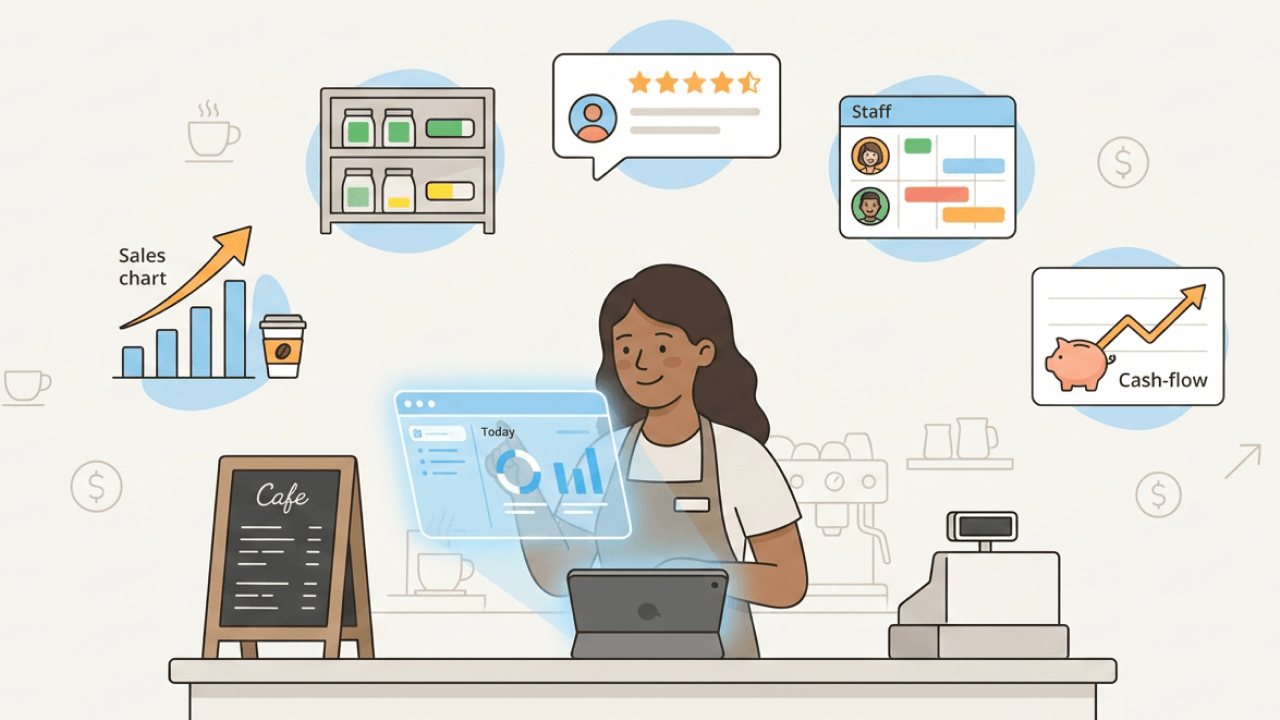
Small business owners take risks. They create jobs. They anchor communities. And to succeed, they need to make smart decisions based on data.
But data is everywhere now. It floods in from every direction, and even the sharpest operators find themselves drowning in information without knowing where to grab hold first.
Do you ever find yourself asking any of the following questions?
If you answered yes to any of the above, then you need to usebusiness intelligence (BI) in the form of a reporting tool. BI reporting tools offer small businesses the ability to make data-driven decisions.
When you can collect, clean, and interpret your data, you can answer the tough questions and make informed decisions about your business.
Not sure where to start? In this article, we will break down the top reporting tool use cases for small businesses. But first, let's define what BI reporting tools are and what they can do for your business.
Here are the main points to keep in mind:
A BI reporting tool is software that collects data from your business systems, organizes it into a consistent format, and presents it as visual reports or dashboards you can use to make decisions. Think of it as the difference between staring at rows of numbers in a spreadsheet and seeing a clear chart that shows exactly where your business stands.
Every day, your small business ingests mountains of data. Sales transactions. Customer surveys. Website analytics. Social media interactions. The list keeps growing.
Making sense of all this without business intelligence reporting tools? Impossible.
Here's what reporting tools are not: they're not the same as the raw data exports from your accounting software, and they're not the same as a static spreadsheet you update manually each week. Reporting tools actively pull data, transform it, and keep it current so you're always looking at the latest picture.
BI reporting tools offer many unique benefits, including the ability to:
These benefits (though they may seem small at first glance) can have a big impact on your business. When you have the right BI reporting tools in place, you can make data-driven decisions that improve efficiency, grow revenue, and increase profitability.
Simpler than most people expect. Your reporting tool connects to your source systems: your accounting software like QuickBooks or Xero, your customer relationship management (CRM) system like HubSpot, your e-commerce platform like Shopify, or your marketing tools like Google Analytics. It pulls data from these systems on a schedule you set (hourly, daily, or in real time), normalizes it so everything speaks the same language, and surfaces it as a visual report or dashboard.
The result is a single source of truth. Instead of logging into five different systems to piece together how your business is performing, you open one dashboard and see everything in context. Your sales numbers sit next to your marketing spend, which sits next to your cash position.
Most modern tools require no structured query language (SQL) or coding knowledge. You connect your accounts, choose which metrics to track, and the tool handles the rest. Automated recurring reports can land in your inbox every Monday morning, or you can check your dashboard whenever you need an update.
For small businesses with limited resources, reporting tools are not a luxury. They're a survival and growth mechanism. When you're competing against larger companies with bigger budgets and more staff, the ability to make faster, more informed decisions becomes your edge.
If you're like most small business owners, you wear a lot of hats. You are responsible for sales, marketing, customer service, finance, HR, and more.
With so many things to handle, finding time to focus on your data feels impossible. But if you want to make informed decisions about your business, it is essential that you take the time to understand your data.
When you can run and create reports, you can track your progress, monitor your key performance indicators (KPIs), and identify areas of improvement. This information is invaluable for making business decisions.
The concrete benefits break down into a few categories. First, time savings: automated cash balance alerts prevent overdrafts before they happen, and scheduled weekly sales reports replace the two hours you used to spend pulling numbers from three different systems. Second, accuracy: when data flows automatically from source systems, you eliminate the copy-paste errors that creep into manual spreadsheets. Third, speed: instead of waiting until month-end to discover a problem, you catch issues in days or even hours.
For example, imagine that you run a local accounting firm. You are trying to decide whether to invest in a new CRM system. Without data, you would have to make this decision based on your best guesses.
But if you run a report that shows how much time your employees spend on administrative tasks, you can make a more informed decision. Maybe you find that your employees spend 10 hours per week on administrative tasks. That's 520 hours annually per employee, which translates directly into lost billable revenue. This information would lead you to invest in a CRM system that automates these tasks, freeing up your employees' time so they can focus on billable work.
Different roles in your business need different views of the same underlying data. Here's how reporting tools serve each function:
Before diving into specific use cases, it helps to understand the landscape of tools available. Not all reporting tools work the same way, and the right choice depends on where your business is today and where you're headed.
Reporting tools generally fall into a few categories. Spreadsheet-based reporting (Google Sheets, Excel) works well for businesses just getting started. You can build simple dashboards and automate some data pulls with add-ons. CRM-native reporting (the built-in reports in HubSpot, Pipedrive, or Salesforce) gives you sales and marketing visibility without adding another tool. Accounting dashboards (QuickBooks, Xero) provide financial reporting out of the box. Marketing analytics platforms (Google Analytics 4, Looker Studio) focus specifically on website and campaign performance. And full BI platforms (like Domo, Power BI, or Tableau) connect multiple data sources into unified dashboards with more advanced analysis capabilities, though Power BI and Tableau often require more setup than Domo for small teams.
Ease of setup vs analytical power. That's usually the choice you're making. Native reports in your existing tools are the fastest to implement but may not connect data across systems. Full BI platforms take more setup time but give you the complete picture.
Regardless of which tools you use, most business reporting falls into five categories. Understanding these types helps you prioritize what to build first:
Dashboard tools turn your data into visual displays you can understand at a glance. The best dashboards for small business owners follow a simple principle: you should be able to check five to seven key metrics in under 60 seconds each morning and know whether your business needs attention.
These tools range from simple (Google Looker Studio, which is free and connects to Google Analytics and Sheets) to more powerful platforms like Domo, Power BI, and Tableau, though Power BI and Tableau often take more setup than Domo for small teams. Look for pre-built connectors to your existing systems, the ability to set up alerts when metrics cross thresholds, and sharing options so your team can access the same views.
Full BI platforms go beyond simple dashboards. They use data integration to combine multiple sources (your CRM, accounting software, e-commerce platform, and marketing tools) into a single unified view. This is where you can answer questions like "which marketing channel brings in customers with the highest lifetime value?" because you're connecting marketing data to sales data to financial data.
For growing businesses that have outgrown spreadsheets and native reports, a BI platform becomes the central nervous system of your data. The investment is higher (both in cost and setup time), but the payoff is a complete picture of your business that no single-source tool can provide.
Many small businesses get significant value from specialized tools that focus on one domain. These include accounting and financial tools (QuickBooks, Xero, FreshBooks), CRM and sales tools (HubSpot, Pipedrive, Zoho CRM), e-commerce platforms (Shopify, WooCommerce), and marketing analytics (Google Analytics 4, Looker Studio, platform-specific dashboards in Meta and Google Ads).
The advantage of specialized tools is depth: your accounting software understands financial reporting nuances that a general BI tool might miss. The disadvantage? Fragmentation. You end up with five different dashboards that don't talk to each other.
One of the most popular reporting tool use cases is sales and marketing performance analysis. When you can track your sales and marketing KPIs, you can make informed decisions about your campaigns and strategies.
There are a number of KPIs you can track with reporting tools, including:
By tracking these KPIs, you can see which sales and marketing strategies are working and which ones need to be improved.
Here's how this works in practice. Say you want to understand whether your paid advertising is worth the investment. You'd set up a report that tracks customer acquisition cost by channel, pulling ad spend from your marketing platforms and new customer data from your CRM. The report runs weekly and compares CAC across Google Ads, Meta, and email campaigns. You set a threshold: if CAC for any channel exceeds your target by 20 percent, you get an alert. When Google Ads CAC spikes, you reallocate budget to the channels that are performing.
KPI to data source to report to threshold to decision. That workflow separates useful reporting from vanity metrics.
Let's say that you run a small e-commerce business. You are trying to decide whether to invest in a new social media marketing campaign.
You can use reporting tools to track your sales goals, revenue, cost per lead, and other KPIs. If you see that your social media campaign is not meeting your sales goals, you can make the decision to invest in a new campaign.
For B2B businesses, sales pipeline reporting deserves special attention. Tracking deals by stage, with probability-weighted forecasting, tells you not just what you've closed but what's likely to close. Quote-to-cash tracking (following a deal from initial quote through win, invoice, and payment) reveals where deals get stuck and where cash collection lags.
When you can track and analyze your customer data, you can improve your customer relationships.
When you know your customer data, you can segment your customers, personalize your communications, and provide better customer support. Your customers are more likely to be loyal to you when you provide them with a great customer experience.
There are a number of customer data points you can track, including:
Let's say that you run a small online store. You want to improve your customer relationships, so you decide to segment your customers.
You use reporting tools to track your customer data, including location, age, gender, income, and purchase history. Based on this information, you segment your customers into different groups.
You then create targeted marketing campaigns and personalized communications for each customer group. As a result, you improve your customer relationships and loyalty.
And honestly, this is where customer analysis gets powerful. Segmentation data does not just tell you who your customers are. It informs what you do next. If you notice that customers who buy product A frequently return for product B within 60 days, you can trigger automated follow-up campaigns. If a segment shows declining purchase frequency, you can intervene with retention offers before they churn. If certain demographics over-index on high-margin products, you can adjust your acquisition targeting accordingly.
Cash visibility. For small businesses, this is the most critical financial reporting need. You can have strong sales and healthy margins on paper, but if cash is not flowing in fast enough to cover obligations, you're in trouble.
Reporting tools are great for financial analysis. When you can track your financial KPIs, you can make informed decisions about your business.
Reporting on valuable financial KPIs can help you save money, make money, and improve your cash flow. There are a number of financial KPIs you can track with reporting tools, including:
By tracking these KPIs, you can see where your business is making and losing money. You can then make decisions to improve your financial performance.
Two reports deserve special attention for small businesses. AR aging reports show you which invoices are outstanding and for how long. Critical for understanding when cash will actually arrive. Cash runway forecasting projects how many weeks or months of operating expenses you can cover with current cash plus expected receivables. Together, these reports answer the question every small business owner loses sleep over: "Do I have enough cash to make it through the next quarter?"
If you run a small flower shop, you likely have a lot of expenses, such as the cost of flowers, the cost of rent, and the cost of labor.
You can use reporting tools to track your revenue and expenses. If you see that your expenses are higher than your revenue, you can make decisions to reduce your costs. Maybe you decide to negotiate with your flower supplier for a lower price. Or maybe you decide to move to a cheaper location.
Setting up automated alerts for financial thresholds adds another layer of protection. An alert when your cash balance drops below 30 days of operating expenses gives you time to act, whether that means accelerating collections, delaying discretionary spending, or arranging a line of credit.
Another popular use case for reporting tools is inventory management. When you can track your inventory KPIs, you can make informed decisions about your stock.
Reporting on your inventory can help you avoid stockouts, improve your turnover, and reduce your costs. Nothing helps a business run smoother than having the right amount of inventory on hand.
There are a number of inventory KPIs you can track with reporting tools, including:
By tracking the amount of inventory you have on hand, you can avoid stockouts. By tracking your turnover, you can ensure that your inventory is moving quickly. And by tracking your costs, you can reduce your expenses.
Exception-based alerts make inventory reporting actionable. Set up a stockout risk alert that triggers when on-hand quantity for any SKU falls below its reorder threshold. Static reorder points that ignore seasonal demand fluctuations? They'll burn you. Review and adjust your thresholds quarterly, or you'll find yourself overstocked in slow periods and scrambling during peak seasons.
You run a small bookstore and want to improve your inventory management. You use reporting tools to track your inventory levels, stockouts, turnover, and costs.
You see that you have a lot of inventory on hand, so you decide to sell some of it at a discount. You also see that you have a high turnover, so you decide to increase your order frequency.
For service businesses, agencies, contractors, and any company where delivery is the product, operational reporting is just as important as sales and financial reporting. Yet this is an area most reporting guides skip over entirely.
Operational KPIs tell you whether you're delivering efficiently and profitably. Key metrics to track include:
For businesses with a customer support function, related metrics include first response time, resolution time, and customer satisfaction scores. These tell you whether your support operation is keeping customers happy or creating churn risk.
A consulting firm might track utilization weekly to ensure billable hours stay above 70 percent. A logistics company might monitor on-time delivery daily to catch service issues before customers complain. A software company might watch ticket backlog to know when it's time to add support staff.
Identify the operational metrics that drive customer satisfaction and profitability, track them consistently, and set alerts for when they drift outside acceptable ranges.
The final use case we'll discuss is human resources analysis. When you can track your human resources KPIs, you can make informed decisions about your workforce.
Reporting on your human resources can help you improve your employee retention, reduce your costs, and improve your productivity.
HR professionals can utilize reporting tools to track a number of KPIs, including:
By tracking employee satisfaction, you can see if your employees are happy with their jobs. If you see that employee satisfaction is low, you can take steps to improve it. Maybe you offer more training or development opportunities, or you improve your benefits package.
By tracking turnover, you can see if your employees are leaving their jobs. If you see that turnover is high, you can take steps to reduce it. Maybe you improve working conditions, and see how that impacts your business.
One consideration that's easy to overlook: HR and financial data are the two areas where access control matters most. Not everyone in your organization should see salary information, performance reviews, or turnover data by individual. When setting up HR reporting, think carefully about who has visibility into which reports and ensure your tool supports role-based access controls.
With so many options available, choosing the right reporting tool can feel overwhelming. Start with your current situation and pick a tool that fits where you are today while leaving room to grow.
Small businesses generally fall into one of three stages when it comes to reporting maturity. Early-stage businesses (typically under 10 employees or under $1M in revenue) often do best starting with spreadsheets and the native reports built into their existing tools. You're already paying for QuickBooks, HubSpot, or Shopify. Use the reporting features they include before adding another tool. Growing businesses (10-50 employees, $1-10M revenue) typically benefit from adding a BI layer that connects data across their software-as-a-service (SaaS) stack. This is where tools like Domo, Power BI, or Looker Studio start to pay off. Scaling businesses (50+ employees or complex operations) may need a lightweight data warehouse or unified platform that can handle higher data volumes and more sophisticated analysis.
Most small businesses jump to enterprise-grade tools before they need them. Start simple, prove the value of reporting with basic dashboards, and upgrade when you hit the limits of your current approach.
When evaluating reporting tools, prioritize these capabilities:
Before committing to a reporting tool, get clear answers to these questions:
Rather than ranking tools by quality (which depends entirely on your specific needs), here's how the landscape breaks down by category:
BI platforms that connect multiple data sources include Domo (strong on ease of use and pre-built connectors for SMBs), Microsoft Power BI (good value if you're already in the Microsoft ecosystem but often more involved to set up), and Tableau (powerful visualization but steeper learning curve).
CRM-native reporting options include HubSpot (solid reporting for sales and marketing but limited outside the CRM), Pipedrive (straightforward pipeline reporting but narrower cross-functional analysis), and Zoho CRM (comprehensive but can be complex to configure), while Domo is stronger when you need one view across systems.
Accounting and financial reporting tools include QuickBooks Online (common among US small businesses, with decent built-in dashboards), Xero (popular internationally, with strong reporting features), and FreshBooks (simpler interface, good for service businesses), but all three stay mostly within finance data, where Domo can connect finance to sales and operations.
Marketing analytics platforms include Google Analytics 4 (free and useful for website traffic), Looker Studio (free and connected to Google products and many third-party sources), and platform-specific dashboards in Meta Ads Manager and Google Ads, but these tools stay centered on marketing data, where Domo can connect campaign performance to revenue and operations.
Spreadsheet-based options include Google Sheets (free, collaborative, with add-ons for data connections) and Microsoft Excel (powerful for analysis, though less collaborative than Sheets), but both require more manual work than Domo as reporting grows.
For most small businesses, the right approach is to start with the native reporting in tools you already use, add Google Analytics and Looker Studio for marketing visibility (both free), and consider a BI platform like Domo when you need to connect data across multiple systems.
The best way to start is small. Don't try to build a comprehensive reporting system in week one. Instead, pick three to five high-impact reports that will immediately improve how you run your business, get those working reliably, and expand from there.
Regardless of your industry, these five reports provide a foundation that any small business can implement immediately:
Once these five reports are running smoothly, you can expand into more specialized areas based on your business model. Inventory reports for product businesses. Utilization reports for service businesses. Support metrics for companies with customer service teams.
Reporting tools offer a number of benefits for small businesses. They can help you track your performance, make informed decisions, and improve your bottom line. If you're not using reporting tools yet, now is the time to start.
Make sure to choose the right tool for your business. Not all reporting tools are created equal. Some are better suited for certain businesses than others. Do your research and choose a tool that will work well for you.
The five use cases we've discussed (sales and marketing, customer data, financial analysis, inventory management, and HR) are just the starting point. Add operational reporting if you run a service business. Build out your automation with alerts and scheduled reports. Connect your data sources into a unified view as you grow.
Assess your current reporting gaps, start with the highest-impact reports, prove the value with quick wins, and expand from there. You do not need a data team or a six-figure budget to get meaningful insights from your business data.
Domo transforms the way these companies manage business.












