
Hai risparmiato centinaia di ore di processi manuali per la previsione del numero di visualizzazioni del gioco utilizzando il motore di flusso di dati automatizzato di Domo.
Guarda il video

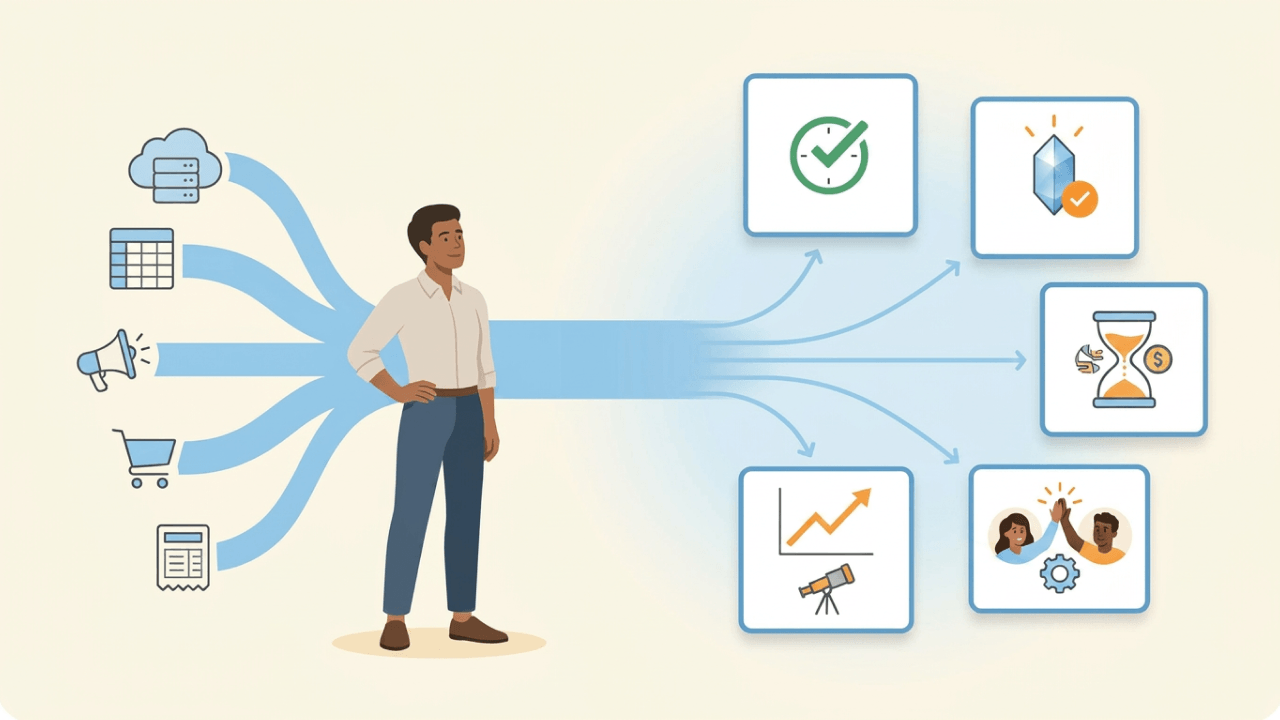
Scattered information costs more than most companies realize. Data integration transforms that chaos into a unified foundation for more informed decisions, streamlined operations, and competitive advantage. This guide explores 12 key benefits, walks through the most common integration types, and provides practical steps for building an integration strategy that scales with your business.
Your company likely gets data from a wide range of sources: customer interactions, sales transactions, marketing campaigns, and internal operations. Without proper integration, this data often remains siloed across different departments and systems. Its usefulness? Limited at best.
Data integration bridges these gaps by consolidating disparate data sources into a unified system, providing businesses with a comprehensive view of their operations. Organizations that break down data silos can improve decision-making, enhance efficiency, and gain deeper insights that drive growth and innovation.
From improving data quality to getting deeper customer insights, data integration helps organizations get more value from their information. In this blog, we'll explore the key benefits of data integration, types of data integration, and practical steps for implementing a data integration strategy.
Whether you're looking to streamline operations, improve customer insights, or scale your business, understanding data integration is essential for staying competitive in a fast-paced digital landscape.
Data integration is the process of combining data from multiple sources into a single, unified system to provide a comprehensive and consistent view of information. Organizations collect data from various departments, platforms, and applications, such as customer relationship management (CRM) systems, enterprise resource planning (ERP) software, marketing analytics, and financial records.
Without integration, this data remains fragmented. Analyzing it becomes difficult. Sharing it? Even harder. By integrating data, businesses can eliminate silos, improve accessibility, and ensure that teams across the organization have access to accurate and up-to-date information.
What does "unified" actually mean in practice? It's the result of a three-step mechanism: ingesting data from source systems, standardizing and resolving entity identities (such as matching customer records across CRM and ERP), and then serving that data through a governed layer. This creates a single, authoritative version of each data element that teams can trust.
Data integration typically involves extracting data from different sources, transforming it into a standardized format, and loading it into a central repository, such as a data warehouse or data lake. This enables businesses to perform advanced analytics, more efficient reporting, and real-time decision-making. This unified foundation is also what makes AI and advanced analytics possible. Machine learning models and predictive analytics require clean, consistent data to deliver accurate results.
Whether through batch processing, real-time integration, or API-based connections, data integration plays a critical role in improving operational efficiency and enabling data-driven strategies.
The journey begins with automated extraction from source systems. Connectors or APIs pull data from CRM platforms, ERP software, marketing tools, finance systems, and other applications on a scheduled or real-time basis. This replaces the manual process of logging into multiple systems, exporting comma-separated values (CSV) files, and copying data between spreadsheets.
Next comes transformation and standardization. Raw data from different sources arrives in various formats. Dates might be stored differently, customer names might follow inconsistent conventions, and duplicate records often exist across systems. Integration pipelines apply rules to clean, deduplicate, and standardize this data into a consistent format.
The transformed data then loads into a centralized repository, whether that's a data warehouse, data lake, or cloud-based analytics platform. Single source of truth. Teams across the organization can access it.
Finally, the integrated data serves dashboards, reports, and analytics tools. Instead of rebuilding reports manually each week, teams access live dashboards that refresh automatically. Analysts spend less time on data preparation and more time on interpretation and strategy.
The contrast between manual and integrated workflows is stark. Manual reporting might involve exporting data from five systems, reconciling discrepancies in spreadsheets, and emailing static reports that are outdated by the time they arrive. Integrated workflows deliver live dashboards with on-demand access to current data, scheduled pipeline refreshes that run automatically, and self-service analytics that reduce ad-hoc requests.
Data integration is essential for businesses seeking to combine and manage data from multiple sources. Each type has its strengths and is suited for different use cases depending on the organization's needs. Teams often use a combination of these methods to build a comprehensive data integration strategy.
Data integration types (ETL, ELT, streaming) differ from system integration architectures (point-to-point, hub-and-spoke, enterprise service bus [ESB], API-led). This section covers data integration methods. System integration patterns focus on connecting applications to automate workflows, while data integration focuses on unifying data for analytics and decision-making.
Here are some of the most common types, each with its own approach to combining and managing data:
This method involves manually collecting data from different sources and consolidating it into a single system. It typically requires human intervention to extract, clean, and upload the data into a database or spreadsheet.
Use case: A small business manually compiles sales reports from multiple regional offices into a master spreadsheet for analysis.
Pros:
Cons:
Manual integration works best for organizations with limited data volumes and infrequent reporting needs. Most teams outgrow this approach more quickly than they expect.
Middleware acts as a bridge between different systems, enabling communication and data transfer. It helps integrate applications that may not naturally connect, ensuring data flows smoothly between them.
Use case: A company uses middleware to connect its customer relationship management (CRM) system with its enterprise resource planning (ERP) software, ensuring customer orders sync automatically with inventory management.
Pros:
Cons:
Middleware integration delivers particular value when you need to connect legacy systems with modern applications without replacing existing infrastructure.
ETL is a traditional method of data integration where data is extracted from various sources, transformed into a standardized format, and then loaded into a data warehouse for analysis.
Use case: A financial institution extracts transaction records from different banking systems, transforms them into a unified format, and loads them into a central database for fraud detection analysis.
Pros:
Cons:
ETL suits use cases where accuracy and completeness matter more than speed. Financial close cycles, compliance reporting, and historical trend analysis benefit from this approach.
Similar to ETL, ELT extracts and loads data into a destination system first, then applies transformations. Teams commonly use this approach in cloud-based data warehouses.
Use case: A marketing team loads raw customer interaction data into a cloud-based data warehouse and then runs analytics to segment customers based on behavior.
Pros:
Cons:
ELT has gained popularity with cloud data warehouses because it takes advantage of their processing power and allows analysts to transform data as needed rather than waiting for IT to modify extraction rules. Teams often skip governance because ELT feels more flexible. They end up with a data swamp instead of a data lake.
Data virtualization provides a unified view of data from multiple sources without physically moving or copying it. Instead, it creates a virtual layer that allows people to query data in real time.
Use case: A business intelligence team uses data virtualization to pull real-time sales data from different regional databases without needing to copy the data into a central repository.
Pros:
Cons:
Data virtualization works well for agile BI environments where teams need fast access to federated data without the overhead of building and maintaining a centralized warehouse.
Application programming interfaces (APIs) allow different software applications to communicate and share data in real time. API-based integration is widely used for cloud applications and services.
Use case: A company integrates its e-commerce website with a payment gateway via APIs, allowing real-time transaction processing and order updates.
Pros:
Cons:
API-based integration has become the standard for connecting cloud applications. It enables the real-time data flows that power personalized customer experiences and instant notifications.
This method involves copying data from one system to another at regular intervals to ensure that multiple databases remain synchronized. Teams can replicate data in real time or in scheduled batches.
Use case: A multinational corporation replicates employee records from local HR databases to a global HR system to maintain consistency.
Pros:
Cons:
This approach processes and integrates data in real time as it is generated, making it ideal for applications that require up-to-the-second insights.
Use case: A financial trading platform integrates real-time stock market data to execute automated trades based on market conditions.
Pros:
Cons:
Streaming integration powers use cases where latency matters: fraud detection systems that need to block suspicious transactions within milliseconds, internet of things (IoT) monitoring that triggers alerts instantly, and personalization engines that respond to customer behavior in real time.
Data integration delivers value across two dimensions: operational improvements that make daily work more efficient, and strategic advantages that shape how organizations compete and grow.
Operational benefits include quicker reporting, reduced manual work, improved data quality, and streamlined collaboration. These improvements affect day-to-day productivity and are often the first returns organizations see from integration investments.
Strategic benefits include more informed decision-making, deeper customer insights, competitive advantages, and the ability to scale analytics as the business grows. These advantages compound over time and often deliver the largest long-term value.
Different roles experience these benefits in distinct ways. Executives gain strategic visibility and shorter close cycles. Analysts spend less time on data preparation and more time on interpretation. Operations teams reduce manual handoffs and error rates.
Data integration brings together information from various departments, giving decision-makers a clearer picture of the whole business. With a unified data source, organizations can analyze trends more easily and make more informed choices.
Consider the difference between a team relying on weekly manual reports vs a team with integrated, real-time dashboards. The first team makes decisions based on data that's already a week old. The second team responds to changes as they happen. The time between a business event and an informed response compresses from days to minutes.
Example: A retail chain integrates customer purchase history, inventory levels, and seasonal trends. This helps them to fine-tune their product selection and pricing. Thanks to this data-driven approach, managers can make more informed decisions on stock replenishment, ensuring popular products are always available while minimizing excess inventory.
When data is integrated, businesses can streamline their processes by breaking down data silos and cutting down on duplicate data entry. Quicker operations. More efficient operations. Teams can access the information they need in real time.
Example: A logistics company integrates data from its fleet management system, warehouse inventory, and customer orders. This connection allows for real-time tracking of shipments, helping warehouse staff and delivery drivers work together more effectively, which reduces delays and improves customer satisfaction.
Data integration allows for easy information sharing between systems. Your team members can access CRM and ERP data without having to log in to different systems. Fewer errors. Quicker access for authorized employees. More value from your current systems.
When we talk about data integration, we're also talking about cleaning and validating data from various sources. This improves consistency and accuracy, ensuring that the data you rely on is trustworthy and error-free. This is crucial for making informed decisions and maintaining the integrity of your business.
How does integration actually improve quality? The process surfaces duplicate records (such as the same customer appearing under two IDs in CRM and billing systems), applies standardization rules (consistent date formats, canonical field names), and creates lineage so teams can trace where a data point originated and whether it was transformed.
Before integration, a customer might exist as "John Smith" in CRM, "J. Smith" in ERP, and "Smith, John" in the support system. After integration with proper identity resolution, a single canonical record emerges with a unified ID across all systems.
Example: A healthcare provider integrates patient records from multiple clinics and hospitals. By standardizing and cleaning the data for consistency, they reduce errors in patient records and ensure that medical professionals have access to accurate and up-to-date information.
When data from sales, marketing, and customer service is integrated, businesses gain a 360-degree view of their customers. This comprehensive customer profile allows businesses to tailor their offerings and communications to meet specific needs.
Example: A financial services company integrates data from its customer support, online banking, and transaction systems to create a detailed customer profile. Analyzing this integrated data allows the company to offer personalized financial products based on each customer's needs and preferences.
When businesses integrate their data, they cut down on redundant tasks and manual processes, leading to more efficient operations and lower costs. Automating data flows between systems frees up resources and lowers operational costs.
To understand the ROI of integration, consider the baseline state: how many hours per week do teams spend on manual data pulls, reconciliation, and error correction? Integration automates these tasks, and the key performance indicator (KPI) change is measurable. Reporting prep time that once took hours drops to minutes, error-related rework decreases, and analyst hours shift from data wrangling to higher-value analysis.
Example: An e-commerce company integrates data from its website, inventory management, and supplier systems. This means the company can automate the process of ordering products when stock levels are low. This not only reduces excess inventory and cuts storage costs but also ensures that customers have access to the latest stock information.
Data integration enables companies to have real-time access to consolidated data, allowing them to generate reports and analyze key metrics more quickly.
Several components work together to make quicker reporting possible. Automated extraction from CRM, ERP, marketing, and finance systems via connectors or APIs replaces manual exports. Automated transformation and standardization eliminate spreadsheet cleanup. Auto-refreshing dashboards remove the need to rebuild reports on a schedule. Self-serve analytics reduce ad-hoc analyst requests.
Example: A global marketing agency integrates data from social media analytics, website traffic, and client campaigns into a single dashboard. This integration allows the agency to track the success of marketing campaigns in real time, adjusting strategies quickly to improve campaign performance or capitalize on emerging trends.
When companies integrate data, teams across various departments can access a unified data set. Having the same information available improves communication and helps employees align their efforts and work towards common organizational goals.
Example: A software development company integrates data from its customer support, product development, and sales teams. By having a single view of customer feedback, bugs, and feature requests, the development and support teams can collaborate more effectively, ensuring that customer needs are addressed promptly in product updates.
As companies expand, data integration ensures that new data sources can be easily incorporated into their existing systems. This scalability is crucial for managing larger volumes of data and supporting business growth without disrupting operations.
Example: A multinational company uses data integration to connect its sales, supply chain, and customer service operations across various countries. As it expands into new markets, the company's data integration system allows it to easily incorporate local data sources, making it simple to manage their operations at scale and ensure the data is consistent across regions.
Data integration helps businesses comply with regulations by storing, processing, and reporting data according to required standards. Integrating their data allows companies to track, audit, and control their data, reducing the risk of non-compliance.
Integration capabilities map directly to compliance requirements. Data lineage supports auditability and traceability for Sarbanes-Oxley (SOX) financial reporting. Role-based access controls (RBAC) enforce least-privilege data access to help meet Health Insurance Portability and Accountability Act (HIPAA) and General Data Protection Regulation (GDPR) requirements. Automated retention and deletion workflows support GDPR right-to-erasure obligations. Centralized logging creates the audit trail regulators expect.
A typical GDPR deletion workflow demonstrates this in action: a customer submits a deletion request, the integration platform identifies all systems containing customer data (CRM, marketing automation, data warehouse), automated deletion propagates across systems, and an audit log records the deletion timestamp and confirms completion.
Example: A financial institution integrates transaction systems, customer identification data, and compliance monitoring tools. This means the system automatically flags customer transactions for potential fraud or compliance issues and makes the data readily available for audits, reducing the risk of regulatory fines and penalties.
With integrated data, organizations can monitor key metrics and events as they happen, enabling them to respond to opportunities or threats immediately. Real-time insights improve agility and competitive advantage.
Example: A cybersecurity firm integrates real-time network traffic data, user authentication logs, and threat intelligence feeds. This allows security analysts to detect and mitigate cyber threats as they emerge, preventing potential breaches before they escalate.
Integrated data enables businesses to provide a smooth and consistent experience across multiple touchpoints. Customers benefit from more helpful support, personalized interactions, and a more cohesive brand experience.
Example: A telecommunications company integrates data from its call center, online support portal, and retail stores. When a customer reaches out for support, the representatives have access to the customer's entire interaction history, allowing them to resolve issues more quickly and make the experience more personal.
One of the most immediate and measurable benefits of data integration is the dramatic reduction in time spent on manual reporting tasks. This benefit deserves special attention because it often delivers the fastest return on integration investments.
The manual reporting workflow is familiar to most organizations: analysts export CSV files from multiple systems, copy data into spreadsheets, write VLOOKUP formulas to match records, reconcile discrepancies between sources, format the results, and email static reports that are already outdated by the time recipients open them. This cycle repeats weekly, monthly, or quarterly, consuming hours that could be spent on analysis and strategy.
Integrated reporting replaces this entire workflow. Automated extraction pulls data from source systems on a schedule or in real time. Standardized transformation rules handle the cleanup that analysts previously did manually. Auto-refreshing dashboards display current data without anyone rebuilding reports. Self-serve access means stakeholders can answer their own questions without submitting requests to the analytics team.
The error reduction component amplifies these time savings. Manual data handling introduces mistakes: a mistyped formula, a missed row during copy-paste, a version control mix-up when multiple people edit the same spreadsheet. Each error requires investigation and correction, and sometimes reports need to be re-issued entirely. Automated validation catches issues at ingestion, and consistent transformation rules eliminate the variability that causes errors.
Organizations that automate data extraction typically reduce reporting preparation time from hours to minutes.
Deeper insights, optimized operations, and early trend identification. Integrated data enables businesses to make proactive decisions that drive growth and innovation.
Example: A fashion retailer integrates sales data, social media trends, and supplier inventory levels. By analyzing this data, the retailer can quickly identify emerging fashion trends and adjust its inventory and marketing strategies accordingly, staying ahead of competitors.
Data integration has become essential for organizations pursuing AI and machine learning initiatives. While many companies recognize that AI requires data, fewer understand the specific requirements that integration must satisfy for AI to deliver accurate, reliable results. And honestly, this is the part most guides skip over.
Machine learning models need more than just data. They need clean, deduplicated training data with consistent feature definitions. When data remains siloed, models train on incomplete information and produce unreliable predictions. A churn prediction model, for example, needs customer data from CRM, product usage data from application logs, and support interaction data from the help desk. Without integration, the model sees only a partial picture of customer behavior.
Beyond training data, AI systems require consistency between training and serving environments. The data pipeline that prepares features for model training must match the pipeline that prepares features for production inference. Integration platforms that maintain this consistency prevent a common failure mode where models perform well in development but poorly in production because the data looks different.
Data drift monitoring represents another integration requirement for AI. Input data distributions change over time. Customer demographics shift, product mixes evolve, and market conditions fluctuate. Integration platforms that track these changes help teams detect when models need retraining before prediction quality degrades.
Several common machine learning (ML) use cases illustrate these requirements in practice:
Understanding the challenges of data integration helps organizations plan realistic implementations and avoid common pitfalls. A balanced view of both benefits and obstacles leads to stronger outcomes.
Multiple data sources with inconsistent formats present the most common challenge. Different systems store dates in different formats, use varying naming conventions, and define the same business concepts differently. A "customer" in CRM might not match a "customer" in the billing system. Resolving these semantic differences requires careful mapping and ongoing maintenance as source systems evolve.
Legacy system integration adds complexity. Older systems may lack modern APIs, require custom connectors, or have limited documentation. The cost of integrating legacy systems sometimes exceeds the cost of replacing them, making this a strategic decision rather than a purely technical one.
Scalability concerns emerge as data volumes grow. An integration approach that works for gigabytes may struggle with terabytes.
Latency vs accuracy trade-offs require deliberate choices. Real-time streaming integration introduces complexity and cost but enables immediate insights. Batch processing is simpler and cheaper but produces data that's always somewhat stale. Fraud detection needs real-time data; monthly financial reporting can tolerate daily batches.
Governance overhead is often underestimated. Integration requires ongoing data stewardship, ownership assignments, and data contracts to prevent quality degradation over time. Without governance, integrated data can become as unreliable as the siloed data it replaced. You'll notice this pattern especially in fast-growing organizations that prioritize speed over sustainability.
Schema drift in source systems can break pipelines. When upstream systems change their data structures (adding fields, renaming columns, or changing data types) integration pipelines may fail or produce incorrect results.
Each of these challenges has mitigations. Teams can resolve semantic inconsistencies through master data management and canonical data models. Teams can wrap legacy systems with APIs or replace them incrementally. Cloud-native architectures can address scalability. Teams can build governance into the integration process from the start.
To integrate data effectively, an organization needs to plan carefully, incorporate the right tools, and develop a clear strategy to ensure data is accurate, consistent, and accessible. By following these strategies, organizations can integrate data more effectively, leading to smoother flow of information, more informed decision-making, improved operational efficiency, and overall business growth.
Before integrating data, clearly define what you aim to achieve. Are you looking to consolidate customer data for clearer marketing insights? Improve reporting accuracy? Enable real-time analytics? Understanding the business objectives will help determine the right integration approach.
Determine which data sources need to be integrated, such as CRM systems, ERP platforms, databases, cloud applications, or third-party APIs. Assess the quality, format, and structure of the data to identify any inconsistencies or potential integration challenges.
There are multiple ways to integrate data, including:
Ensure data from different sources follows consistent formatting, naming conventions, and structures. Data cleansing should address missing values, duplicate records, and inconsistencies to improve accuracy and reliability.
Manual data integration can be time-consuming and error-prone. Automated data integration tools, such as integration platforms as a service (iPaaS) or workflow automation software, can streamline data transfer and synchronization between systems.
Data integration must adhere to security and regulatory standards such as GDPR, HIPAA, or Service Organization Control 2 (SOC 2). Implement encryption, access controls, and audit logs to protect sensitive data and ensure compliance.
Data integration is an ongoing process, not a one-time task. Regularly monitor data pipelines, conduct quality checks, and update integration processes as data sources evolve. Implement data governance policies to maintain accuracy and integrity over time.
Selecting the right data integration platform requires matching capabilities to your organization's specific requirements. A structured evaluation helps avoid both over-engineering and under-investing.
Start with latency requirements. Does your use case need real-time streaming, or is scheduled batch processing sufficient? Fraud detection and personalization engines need sub-second data. Monthly financial reporting can tolerate daily refreshes. Real-time capabilities cost more and add complexity, so pay for them only when the use case demands it.
Consider data volume and growth trajectory. A solution that handles your current data volumes may struggle as the business scales. Cloud-native platforms typically offer more elastic scaling than on-premises alternatives, but the total cost of ownership varies based on your specific usage patterns.
Evaluate connectivity breadth. How many pre-built connectors does the platform offer for your existing systems? Custom connector development adds time and cost.
Assess governance and lineage capabilities. Can the platform track where data originated and how it was transformed? Does it support role-based access controls? Can you implement data contracts that define quality expectations?
Examine AI and ML readiness. If advanced analytics is on your roadmap, consider whether the platform supports feature store integration, reverse ETL for activating insights in operational systems, and the data versioning that machine learning workflows require.
Evaluate ease of use. Who will build and maintain integrations? Platforms with visual, no-code interfaces enable business analysts to create integrations without IT involvement. Code-first platforms offer more flexibility but require specialized skills.
Finally, consider total cost of ownership beyond licensing fees. Factor in implementation time, training, ongoing maintenance, and the cost of the infrastructure the platform requires. I've seen teams focus exclusively on licensing only to discover that implementation costs dwarf the software expense.
Understanding the benefits of data integration is only the first step. The real impact comes from choosing a platform that makes integration scalable, reliable, and easy to manage as your business grows.
Domo connects the capabilities discussed throughout this article to the outcomes organizations need. Over 1,000 pre-built connectors address the automated extraction requirement, pulling data from CRM, ERP, marketing, finance, and hundreds of other systems without custom development. No-code transformation tools handle the standardization and deduplication that improve data quality, enabling people on business teams to prepare data without waiting for IT resources.
Built-in governance features address the compliance and auditability requirements that regulated industries demand. Data lineage tracks where information originated and how it was transformed, supporting SOX audit readiness. Role-based access controls enforce least-privilege data access for HIPAA and GDPR compliance. Certification workflows help teams identify which data sources are trusted and production-ready.
For organizations pursuing AI and advanced analytics, Domo provides the clean, governed data foundation these technologies require. Integrated AI capabilities help teams move from historical reporting to predictive insights without building separate infrastructure.
With Domo, teams can connect data from hundreds of sources, automate data flows, and turn integrated data into real-time insights that drive action across the organization. By using a modern data integration platform built for analytics and decision-making, businesses can move more quickly, break down silos, and get more value from their data.
Learn more about how Domo supports end-to-end data integration for modern businesses and helps teams turn connected data into more informed decisions.
Domo transforms the way these companies manage business.












