What Is a Data Pipeline? Definition and Types Explained
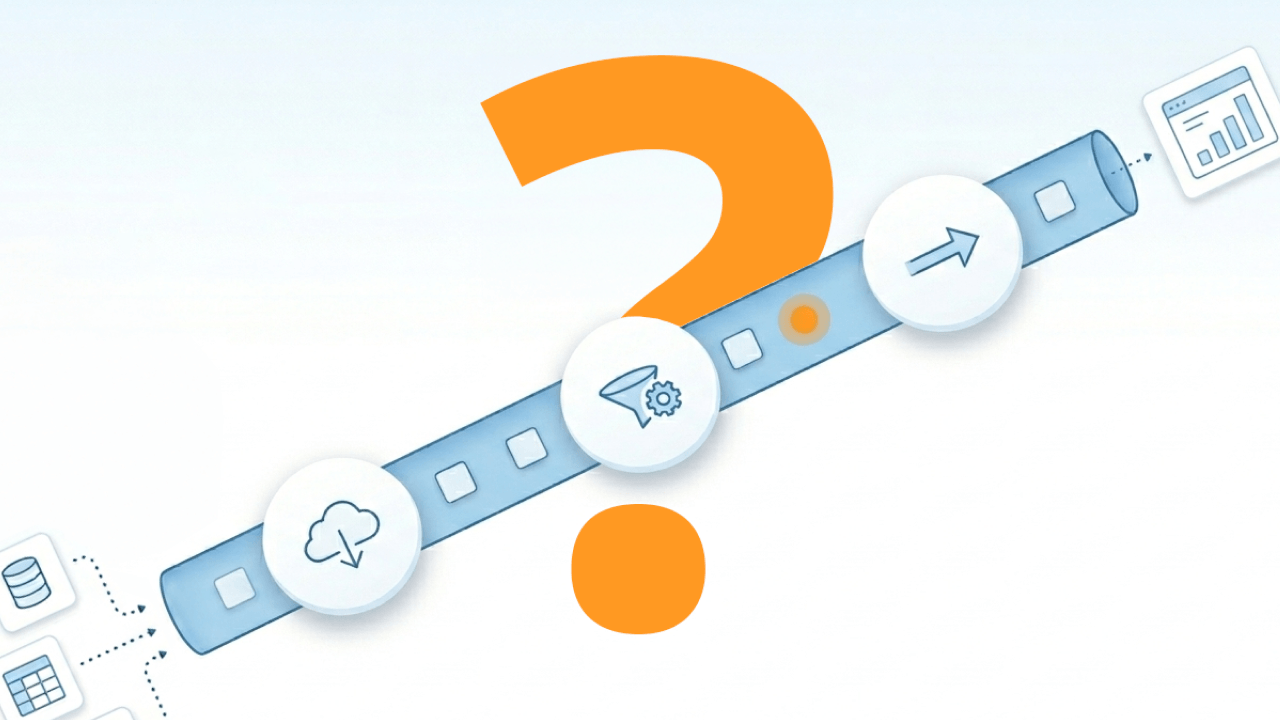

Data pipelines automate the movement and transformation of data across systems, replacing manual exports and one-off scripts with repeatable, observable workflows. This article covers pipeline architecture, the differences between batch and streaming approaches, common use cases from BI dashboards to ML feature engineering, and practical guidance for building pipelines that scale.
Key takeaways
A good data pipeline keeps teams out of spreadsheet ping-pong and out of "whose number is right?" debates.
- A data pipeline is an automated workflow that moves data from source systems to a destination while applying transformations along the way.
- Pipelines sit between raw source systems and analytics, AI, or machine learning destinations, handling the messy work of extraction, cleaning, and loading.
- ETL is just one specific pattern within the broader category of data pipelines, which also includes streaming, reverse ETL, and feature engineering workflows.
- Modern pipelines increasingly treat streaming, automated monitoring, and observability as baseline requirements, especially as the Stanford Institute for Human-Centered Artificial Intelligence (HAI) 2025 AI Index reports that 78 percent of organizations use AI in at least one business function.
- At scale, pipelines need centralized governance and control so data stays trusted across teams and tools.
What's a data pipeline?
A data pipeline is an automated workflow that moves data from one or more sources to a destination, applying transformations and quality checks along the way. Set it up once, and it runs on a schedule or in response to events. Teams stop manually exporting spreadsheets or running scripts.
Three characteristics define a proper pipeline. Automation means it runs without manual intervention. Observability gives you logs, alerts, and lineage tracking so you know what happened. Reproducibility ensures the same inputs always produce the same outputs.
Compare this efficient structure to the alternative: spreadsheets emailed between teams, one-time Structured Query Language (SQL) scripts, manual application programming interface (API) pulls. Those approaches work for quick prototypes. They fall apart under higher volume, faster velocity, or when the person who built them leaves the company. Gartner estimates the resulting data quality problems cost organizations an average of $12.9 million per year. That figure alone explains why automating data movement isn't just convenient. It is financially necessary.
Pipelines serve analytics through BI dashboards, power data science with feature engineering and model training, and drive operations by syncing customer relationship management (CRM) data to support tools. Increasingly, they also feed AI workflows, like agents that need governed, up-to-date datasets instead of ad hoc prompts and copy-pasted exports.
Data pipeline architecture and core components
Architecture determines whether your pipeline fails silently or recovers gracefully. A pipeline that worked in development can break in production because nobody defined ownership for schema changes, or because there was no retry logic when the source API rate-limited the connection.
Different teams feel this pain differently. Data engineers often get stuck maintaining a long list of custom integrations. Data architects and platform architects worry about performance trade-offs in hybrid environments. IT and data leaders worry about governance and compliance across a messy tool landscape. Analytics engineers need transformation logic that stays consistent as stakeholders ask for "just one more field."
Data sources
Sources include databases, software APIs, event streams, and file drops. Source systems rarely expose data in the shape you need. Extraction must handle pagination, rate limits, and incremental markers like timestamps or change data capture logs.
Cloud versus on-premises sources affect latency, authentication patterns, and network security. A SaaS API behaves differently than a database sitting in your data center.
In larger organizations, the harder problem is usually variety, not volume. When you're pulling from hundreds of apps and databases across business units, "just build another connector" turns into a recurring integration cycle. Engineering time disappears. Maintenance compounds.
Ingestion layer
Ingestion is the handoff from source to pipeline. Two patterns dominate:
- Pull-based: Scheduled jobs query sources at regular intervals. Common for batch processing.
- Push-based: Event-driven triggers or webhooks fire when new data arrives. Standard for streaming.
Reliability tactics matter at this stage. You need retries with exponential backoff, idempotent writes, and dead-letter queues for records that fail validation.
Here's where scale sneaks up on teams. If every new source requires a custom-built connector or bespoke script, pipeline development slows down and maintenance overhead grows. Many teams look for ingestion tooling that covers a wide range of sources out of the box so data engineers can spend less time on plumbing.
Transformation engine
Transformations clean, enrich, join, and reshape raw data. In-flight transforms apply during ingestion for basic filtering and lightweight mapping. Post-load transforms apply in the warehouse via SQL for complex joins, aggregations, and business logic.
Schema evolution is a major failure mode. Upstream changes break downstream transforms if data contracts aren't enforced. When a source team renames a column without notice, everything downstream can fail. Teams almost always underestimate how quickly schema drift compounds. A single renamed field can cascade into broken dashboards, failed model training jobs, and hours of debugging.
Transformation is also where analytics engineers tend to live day to day. Reusable transformation workflows matter because stakeholder requests don't stop at one dashboard.
Storage and destination layer
Destinations include warehouses, lakehouses, and operational targets for reverse ETL. Your destination choice affects query performance, storage cost, and who can access what.
Lineage and governance attach at this layer. They track where data came from and who can see it.
Pipelines also increasingly have more than one "destination." A single data pipeline might load a warehouse for BI, publish a clean dataset for self-service analytics, and sync curated fields into operational tools. Some teams add an additional destination category: governed datasets that AI tools and agents can query without creating new copies of sensitive data.
A control plane, the layer that centralizes orchestration, monitoring, and alerting, sits alongside these layers.
How a data pipeline works
Pipeline runs start based on a schedule, an event, or a dependency. A schedule might run hourly. An event might fire when a new file lands. A dependency triggers when an upstream pipeline completes.
Extract
Extraction pulls data from sources. You choose between incremental extraction (only new or changed records) and full extraction (the entire dataset).
Incremental is cheaper but requires reliable change markers like timestamps or change data capture logs. Full is simpler but expensive at scale and risks overwriting deleted records.
For API sources, you handle pagination. For databases, you manage connection pooling. Capturing extraction metadata like run ID and timestamp is essential for debugging later.
For governed environments, that metadata also supports audit trails. It makes it easier for IT and data leaders to answer simple questions that should never turn into a fire drill: "When did this dataset refresh?" or "Which upstream source changed?"
Transform
Transforms range from lightweight type casting and null handling to complex joins across multiple sources. ETL transforms data before loading it. ELT loads raw data first and transforms it inside the warehouse.
ELT dominates modern stacks because cloud warehouses handle compute efficiently and transformations stay version-controlled. ETL still fits when destinations can't handle raw data or when sensitive fields must be masked before landing.
Idempotent transforms prevent duplicates during retries. If a pipeline fails halfway through and restarts, a non-idempotent transform might double-count metrics. This is one of the most common sources of "why don't these numbers match?" conversations between data teams and stakeholders.
Load
Loading writes data to the destination using append, upsert, or merge patterns. Append adds new rows. Upsert inserts new rows or updates existing ones. Merge handles complex logic for matching records.
Partitioning strategies by date or tenant affect query performance and cost. Load failures happen frequently (schema mismatches, permission errors, quota limits). Pipelines need rollback or replay capabilities to recover without manual cleanup.
Types of data pipelines
How fresh does the data need to be? What operational burden is acceptable?
Batch pipelines
Batch pipelines run scheduled jobs that process data in chunks. Hourly, daily, or on-demand. Batch is simpler to build, debug, and cost-optimize because compute spins up only when needed.
Batch fits when latency requirements are measured in hours and data volumes are large but not continuous. It breaks down when dashboards need sub-hour freshness or downstream systems depend on near-real-time syncing.
Streaming pipelines
Continuous processing. Records flow through as soon as they arrive. Streaming pipelines with event-driven architectures and stream processors keep data moving constantly.
Streaming fits fraud detection, live dashboards, telemetry, or any use case where stale data has immediate business cost (for example, Internet of Things (IoT) device monitoring). Streaming is overkill for nightly reports, historical analysis, or teams without the operational capacity to manage always-on infrastructure.
Micro-batch offers a middle ground. It processes data in small, frequent batches, providing near-real-time latency with simpler operations than true streaming.
Most organizations end up mixing these types. A single data pipeline portfolio often includes nightly batch loads for finance, micro-batch for marketing dashboards, and streaming for operational alerting.
Data pipeline vs ETL pipeline
People use these terms interchangeably. The relationship is subset, not synonym.
ETL is a specific pattern where transformation happens before data lands in the destination. A data pipeline is the broader category. It includes ETL, ELT, replication, reverse ETL, and machine learning feature pipelines.
This distinction matters during procurement. If someone asks for an ETL tool but actually needs event streaming or reverse ETL, the wrong tooling choice follows.
Benefits of data pipelines
When pipelines replace manual processes, dashboards refresh without someone running a script. Data quality issues surface before stakeholders notice. Teams stop spending what McKinsey estimates is 30 to 40 percent of their time just searching for the right data.
- Automation: Scheduled and event-driven runs eliminate manual exports and reduce human error.
- Data quality: Built-in validation catches nulls, duplicates, and schema mismatches before bad data reaches dashboards.
- Reproducibility: Same inputs produce same outputs, making debugging and audits straightforward.
- Scalability: Pipelines handle growing data volumes without proportional increases in manual effort.
- Observability: Logs, lineage, and alerts make it clear what ran, when, and whether it succeeded.
These benefits compound. Automation frees time for data quality work. Quality improvements reduce firefighting. Less firefighting means faster iteration.
Data pipeline use cases
Pipelines look different depending on what they power. A marketing analytics pipeline has different sources, transforms, and freshness requirements than a fraud detection pipeline.
BI and reporting dashboards
Sales, finance, and operations teams need consolidated views across CRM, enterprise resource planning (ERP) systems, and spreadsheets. Batch pipelines pull daily snapshots, join on common keys, and load to a warehouse where BI tools query the data. Executives see consistent numbers without waiting for someone to pull a report.
For business executives, the win is simple: one version of the truth that stays current. Fragmented pipelines feeding different systems tend to produce inconsistent reporting. Every inconsistent report is a decision made in the dark.
Marketing analytics
Campaign performance depends on combining ad platform spend with lead conversions. Pipelines normalize metrics across platforms, attribute conversions, and surface ROI by channel.
You'll notice that most marketing teams operate on a tighter feedback loop than they used to. Marketers shift budget based on yesterday's performance rather than last month's data.
Operational alerting
Support teams need to know when key accounts hit usage thresholds or error rates spike. Streaming pipelines ingest event logs, apply windowed aggregations, and trigger alerts. Issues surface in minutes rather than waiting for a customer complaint.
ML feature engineering
Data science teams need consistent, reproducible features for model training and inference. Pipelines transform raw data into feature tables, track lineage, and serve features to training jobs and production models.
This is also where data-to-agent workflows show up. If an AI agent is answering questions, triaging tickets, or assisting analysts, it still needs the same thing any model needs: trusted, governed input data from a data pipeline, with clear lineage and refresh expectations.
How to build a data pipeline
A pipeline built quickly for a demo often ends up running in production. Breaking every Monday. Nobody knows how to fix it.
Define requirements before choosing tools
What sources are involved? What freshness is required? Who consumes the output? What happens if it fails? Teams that skip these questions rebuild when hidden requirements surface later.
If the environment is hybrid, add one more requirement question: where does the data live today, and where is it going tomorrow? Data architects and platform architects usually care a lot about avoiding a rip-and-replace plan just to connect legacy on-premises systems to cloud platforms.
Choose an orchestration layer
Orchestrators manage dependencies, retries, and scheduling. Open-source tools offer flexibility but require operational investment. Managed services reduce overhead but limit customization.
For teams without dedicated data platform engineers, managed or low-code orchestration reduces time to production. Orchestration decisions also affect centralized control (when pipelines sprawl across multiple tools, it gets harder for IT and data leaders to apply consistent governance, security policies, and compliance reporting across the full data flow lifecycle).
Establish data contracts
Define schemas, freshness expectations, and ownership upfront. When upstream teams change a field name without notice, contracts surface the break before dashboards go wrong.
Data contracts help pipelines stay trusted across teams. Data engineers can ship changes with fewer surprises.
Build incrementally
Start with a single source and destination. Validate that extraction, transformation, and loading work end-to-end before adding complexity. Teams that try to connect everything in one project often ship nothing.
If the organization has a long backlog of sources, this is also where connector strategy matters. Connecting dozens or hundreds of systems one-by-one with custom scripts is a fast way to rack up technical debt.
Add observability from the start
Logging, alerting, and lineage tracking aren't afterthoughts. Instrument pipelines to answer: Did it run? Did it succeed? How much data moved? Where did it come from?
For IT and data leaders, observability also reduces compliance blind spots. If a pipeline touches sensitive data, the organization needs to know who accessed it, where it went, and whether policies were followed.
Plan for failure and recovery
Pipelines fail. APIs rate-limit, schemas change, destinations go down. Design for idempotent runs so re-running doesn't duplicate data. Build backfill capabilities to replay historical data when logic changes.
How Domo helps with data pipelines
Building and maintaining data pipelines requires connectivity, transformation, orchestration, and governance. These functions often end up split across ingestion tools, a separate transformation layer, and yet another system for monitoring and access control. Domo consolidates those workflows so teams can manage pipelines, permissions, and monitoring in one place.
Over 1,000 pre-built connectors to cloud apps, databases, and on-premises systems reduce custom integration work, so teams spend less time building one-off connections.
Magic ETL and Magic Transform offer visual, low-code transformation options, so analysts and analytics engineers can build reusable workflows without custom scripts. Data engineers can also use SQL for complex logic.
Built-in scheduling, dependency management, and alerting can help pipelines run more consistently without adding a separate orchestrator. Role-based access, audit trails, and lineage tracking support security and compliance requirements.
Federated queries let teams access data without replicating everything into a warehouse, which can reduce complexity and storage costs.
For AI workflows, Agent Catalyst connects AI agents directly to governed Domo datasets through centralized tool management, so agent outputs stay tied to trusted data pipeline inputs instead of one-off exports.
Final thoughts
Data pipelines turn scattered data into usable information. The concepts are straightforward. Production reliability depends on architecture decisions, operational discipline, and tooling that fits your team's capacity.
Start with clear requirements. Build incrementally. Instrument for observability. Plan for failure. Revisit the design as data volumes and use cases evolve.
The payoff is dashboards that refresh on time, models that train on consistent data, and teams that spend time on analysis instead of data wrangling. If you're ready to put connectors, transformations, orchestration, and governance under one roof, get a demo and see what a modern pipeline looks like in Domo.