
Se ahorraron cientos de horas de procesos manuales al predecir la audiencia de juegos al usar el motor de flujo de datos automatizado de Domo.
Ver el vídeo


Customer relationship management (CRM) software centralizes customer information and tracks interactions from first contact through conversion. But the data alone only tells part of the story. When you connect your CRM to a business intelligence platform, you gain the ability to reveal patterns, predict outcomes, and guide sound decisions across your entire organization.
Here are the main points to keep in mind:
Connecting your CRM system with a business intelligence platform creates unified analytics across all customer data. That's CRM-BI integration at its core. Rather than treating these as separate tools, integration allows data to flow from your CRM into BI dashboards, reports, and predictive models automatically.
Here's how the integration works in practice:
Consider a practical example. A lead enters your CRM, progresses through opportunity stages, and eventually closes as revenue. With CRM-BI integration, that entire journey appears in a single dashboard showing conversion rates by source, average deal cycle by rep, and revenue forecasts updated in near real-time.
Many organizations find themselves data rich but insight poor. Thousands of customer records sit in their CRM. Yet they struggle to answer basic questions like which campaigns drive the highest-value customers or why deals stall at specific pipeline stages. Integration makes CRM data analytically accessible.
Your CRM serves as the system of record for customer interactions. It captures who your customers are, what they've purchased, how they've engaged with your team, and where they sit in your sales process. BI platforms take this raw data and transform it into analytical models that reveal trends, anomalies, and opportunities.
The specific CRM objects that flow into BI models include:
Each of these objects feeds into BI models where they can be joined, aggregated, and analyzed together. Connecting opportunity data with activity records reveals which sales behaviors correlate with closed deals. Joining account data with support tickets shows which customer segments require the most service resources.
The synergy goes beyond simple reporting. BI platforms can apply statistical models to CRM data, identifying patterns that would be impossible to spot manually. They can also combine CRM data with external sources like marketing automation, finance systems, and product usage data to create a complete picture of customer value.
One common point of confusion: the difference between reports built into your CRM and dashboards you can create with a BI platform. Both show data, but they serve different purposes and have different capabilities.
Native CRM reports work well for quick operational questions. Checking today's pipeline. Seeing which leads need follow-up. BI dashboards excel at strategic analysis, combining data from multiple sources to answer questions about trends, performance drivers, and future outcomes.
The most effective organizations use both. Sales reps rely on CRM reports for daily workflow while leadership uses BI dashboards for strategic decisions and cross-functional visibility.
Integrating CRM software with your BI solution can be a significant change for all departments ranging from marketing, sales, customer support, IT, and finance. The investment pays off through measurable improvements across several dimensions.
When evaluating potential benefits, separate leading indicators from lagging outcomes. Leading indicators like data completeness, activity logging rates, and CRM field coverage improve immediately after integration and signal that the foundation is solid. Lagging outcomes like conversion rate improvement and sales cycle reduction follow when teams actually use the integrated insights to change their behavior.
Organizations with strong CRM hygiene (above 85 percent field completion rates) typically see the most dramatic improvements because their data is ready for analysis from day one.
The key benefits include:
A CRM system does more than just build a consolidated database of client information. When integrated with BI, it creates a 360-degree view that includes purchase history, support interactions, marketing engagement, and product usage all in one place.
Happy customers become loyal clients. Loyal clients tell their friends and colleagues about your business. Understanding why and when customers are satisfied or frustrated requires connecting data that lives in different systems. Integration brings CRM data together with support tickets, Net Promoter Score (NPS) data, and engagement metrics in a single analytical environment.
Integration enables forecasting and opportunity scoring that goes far beyond what either system can do alone. Analyzing historical patterns in your CRM data allows BI platforms to predict which deals are most likely to close, which customers are at risk of churning, and which leads deserve immediate attention.
Predictive lead scoring uses factors like company size, industry, engagement history, and behavioral signals to rank prospects by likelihood to convert. Pipeline forecasting applies statistical models to stage progression data, accounting for historical conversion rates and deal velocity to produce more accurate revenue predictions. And honestly, this is where teams often stumble: they trust these scores without validating them against actual outcomes, leading to misallocated resources when the model drifts over time.
Instead of waiting for deals to stall, teams can intervene early when predictive signals indicate risk.
CRM technology is the most effective way of making sure that sales and marketing efforts are coordinated. Sharing data between departments is simple with sales CRM software integrated into BI. You can follow clients' progress in real-time, verify support tickets, and deliver a consistent customer experience.
CRM software enables marketing teams to find more qualified prospects, sales teams to tailor communication, and customer service teams to know precisely what each customer requires.
Understanding the benefits is one thing. Seeing how organizations actually apply integrated CRM-BI systems makes the value concrete.
Pipeline management improves dramatically when CRM data flows into BI dashboards. Instead of relying on static CRM reports, sales leaders can see pipeline health across multiple dimensions simultaneously: by rep, by region, by product line, by deal size, and by stage.
Forecast accuracy increases when BI platforms apply historical conversion rates to current pipeline data. If your team historically closes 30 percent of deals that reach the proposal stage, the system can weight pipeline value accordingly rather than counting every opportunity at face value.
Sales teams can also track leading indicators like activity levels, stage velocity, and engagement scores that predict future pipeline health before revenue numbers reflect problems.
Integrated data enables sophisticated segmentation that combines CRM attributes with behavioral data from other sources. Rather than segmenting customers by simple demographics, you can identify groups based on purchase patterns, support needs, engagement levels, and lifetime value.
These segments inform both marketing campaigns and sales prioritization. High-value segments might receive white-glove treatment while at-risk segments trigger proactive outreach. Segmentation stays current as CRM data updates, rather than relying on static lists that quickly become outdated.
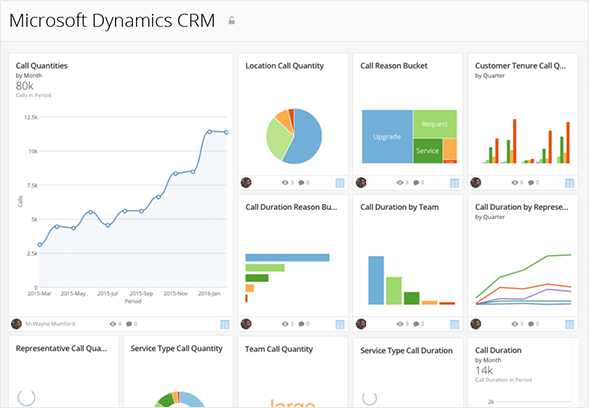
Present the data from your CRM sales analytics solution in an easy-to-understand style. Every day, your team sees your CRM dashboard, which provides a real-time visual interface into the sales organization. You'll want to make sure it's user-friendly and configurable for CRM connections.
You can build an effective CRM dashboard using a BI tool. The dashboard can give stakeholders a unified view of your CRM, including:
A customizable dashboard ensures that you and your team are not overburdened with information you do not require. Choose a CRM that integrates well with a BI platform to create dashboards that are easy to navigate and will generate helpful insights from your CRM data.
Design principles matter as much as the metrics themselves. Dashboards should answer specific questions rather than displaying every available data point. Group related metrics together, use consistent color coding, and provide drill-down paths so people can investigate anomalies without leaving the dashboard.
For the best results, follow a structured approach to combining CRM and BI. The process involves more than just connecting systems. It requires thoughtful planning around data, metrics, and data governance.
To find the KPIs that are most closely connected with the business's goals and objectives, get to know your customers. Reassess your KPIs on a regular basis to keep an eye on changing business conditions, opportunities, and dangers that could alter your data's outcome.
Make a list of data sources that will deliver the most useful information. You can use database systems, accounting software systems, enterprise resource planning programs, and content management software as data sources. Include additional sources of unstructured data, such as email queries and social media.
Beyond listing KPI names, define each metric with precision before integration begins:
This level of specificity prevents the problem where sales, finance, and marketing all report different numbers for the same metric because they define it differently.
An estimated 63 percent of businesses lack a systematic method to reduce dirty data. That explains why so many integration projects stall before delivering value. Structured and unstructured data both hold a wealth of information, but only if you have a strategy for appropriately combining them. Test the quality of your data sources and choose a program to help you clean and manage your data on a regular basis.
Identity resolution and deduplication deserve special attention because they are common failure points. Establish a matching hierarchy for CRM records:
Define survivorship rules for when duplicates are found. Which record wins? The most recently updated? The most complete? The one from the primary CRM versus imported lists? Document these decisions and apply them consistently.
Monitor data quality on an ongoing basis by tracking freshness (when records were last updated), completeness (percentage of required fields populated), and uniqueness (duplicate detection rate). Set up alerts when these metrics fall below acceptable thresholds.
Deleted record handling is another often-overlooked consideration. When records are hard-deleted from your CRM, they can orphan related rows in your BI system, breaking historical reports. Decide whether to soft-delete, archive, or cascade deletions and implement the approach consistently.
Integration architecture is not one-size-fits-all. The right approach depends on your organization's size, data volume, latency requirements, and technical maturity.
Start with the simplest approach that meets your requirements. Many organizations begin with native connectors and evolve to warehouse-based architectures as their needs grow more sophisticated.
Consider latency requirements carefully. If sales leaders need pipeline updates within minutes, application programming interface (API)-based or streaming approaches may be necessary. Daily refreshes? Batch ETL processes are simpler and more cost-effective.
As adoption rises, keep records of employee engagement with the BI tool by evaluating the number of people using it and reporting usage to see if your intelligence is useful. As your data volume and adoption rate grow, you'll need to refine your metrics. Add new dashboards, KPIs, and reports which are useful on a regular basis, and remove or update those that aren't.
Validation against source CRM reports is non-negotiable. Before trusting BI dashboards for decisions, pull the same metric from both systems and compare. Run an open pipeline report in your CRM and compare the total to your BI dashboard. Document any variance and trace it to root causes like timing differences, filter discrepancies, or calculation variations.
Set operational service-level agreements (SLAs) for your integration:
Monitor these SLAs and investigate when they are missed.
Integration projects often run into predictable problems. Usually for predictable reasons. Understanding common failure modes helps you avoid them.
CRM-specific pitfalls that break downstream analytics include:
Data quality issues remain the most common challenge. If account records, opportunities, activities, sales stages, customer identifiers, and revenue values are unreliable, the resulting dashboards and analytics models will not be trusted. Invest in data cleaning before building dashboards, not after.
User adoption is equally critical. Even a sophisticated integration falls short if teams continue using spreadsheets instead of dashboards. Involve the people who will use the dashboards in dashboard design, provide training, and demonstrate clear value early to build momentum.
Governance and security considerations commonly block or derail CRM-BI integration projects in enterprise environments. Address these proactively rather than discovering them late in the project.
Apply least-privilege access principles. Not every person with BI access should see every CRM field. Sensitive data like personal email addresses, phone numbers, and compensation details should be masked or excluded unless required for specific use cases.
Implement row-level security that mirrors your CRM territory and role assignments. If a sales rep can only see their own opportunities in the CRM, they should see the same restriction in BI dashboards. This prevents accidental data exposure and maintains trust in the system.
Audit log requirements matter for revenue reporting. Track who accessed what data, when, and from where. This is not just a compliance checkbox. It's a practical safeguard when questions arise about data accuracy or unauthorized access.
For organizations subject to the General Data Protection Regulation (GDPR), the California Consumer Privacy Act (CCPA), or industry-specific regulations, ensure your integration approach supports data subject requests. When a customer requests deletion, you need a process to purge or anonymize their data across both CRM and BI systems within required timeframes.
AI and machine learning are transforming what's possible with integrated CRM-BI systems. These technologies enable capabilities that would be impossible with traditional reporting alone.
Predictive analytics applies machine learning models to historical CRM data to forecast future outcomes. Which deals are most likely to close this quarter? Which customers are showing early signs of churn? Which leads should reps prioritize today? AI answers these questions by identifying patterns across thousands of data points that humans would never spot manually.
Automated insights surface anomalies and trends without requiring people to know what questions to ask. Instead of building reports for every possible scenario, AI can alert you when something unusual happens. A sudden drop in activity levels for a key account. An unexpected spike in deal slippage.
Conversational analytics allow people to ask questions in natural language rather than building complex queries. A sales manager can type "show me win rate by region for enterprise deals last quarter" and receive an instant visualization without knowing structured query language (SQL) or dashboard building.
These capabilities are most powerful when built on clean, integrated data.
Choosing the best BI platform for your business is a difficult undertaking. Sure, you want a long list of features, easy-to-use mobile alternatives, and a large amount of cloud storage. But once you've chosen a platform, the team will need to learn how to use it. Before you buy, take the time to understand your brand's and business's requirements, as well as your team's technological expertise.
The correct BI software can boost your team's productivity dramatically, but only if the platform is simple to use. It's not going to delight anyone if one headache is replaced with another, so research is essential.
Key evaluation criteria include:
Security and compliance capabilities deserve particular attention for enterprise buyers. Look for open authorization (OAuth) authentication support, encryption at rest and in transit, and the ability to replicate CRM role-based access in your BI environment. These features are often afterthoughts in BI platform selection but become critical blockers during implementation. I've seen more than a few projects grind to a halt over security requirements that nobody thought to check upfront.
Another element to consider is the ability to integrate with your existing systems. BI vendors work well with many different types of CRMs, ranging from the most popular options to more niche varieties. Before making a decision, ensure that the CRM and BI platform are easy to integrate.
Sales metrics derived from CRM analytics can help you enhance your performance, optimize your sales efforts, and improve accountability. Your sales team is responsible for a wide range of operations and works in a fast-paced atmosphere. A sales analytics plan that is well-defined gives your team direction and clarity, allowing them to focus on what they do best.
The path from disconnected CRM data to integrated sales intelligence requires thoughtful planning, clean data, and the right technology foundation. Start by defining your most important metrics and ensuring your CRM data quality supports accurate analysis. Choose an integration approach that matches your organization's maturity and requirements. Build dashboards that answer specific business questions rather than displaying every available data point.
Ready to see what integrated CRM analytics can do for your organization? Start a free trial and connect your CRM data to powerful BI dashboards in minutes.
Domo transforms the way these companies manage business.












