A place for AI forward engineers and leaders
Watch sessions on building AI agents grounded in your governed data.
Watch now

This next presentation is awesome. I'm going to introduce Riley or Thomas. Riley who just jumped on, this is how this adventure started for me. I got an email from someone internally, Thomas, and it said "the coolest event ever," right? Thomas had met with some of our folks at Domo and started to learn some of these AI-first techniques. And what he's going to do today is show us how he's applied these AI-first building techniques to take Excel and move it into a live sales ROI calculator app in Domo for Cara Loop. So Thomas, I'll get out of your way. Thanks so much.
Awesome. Thanks, Matt. I appreciate it. And yeah, you're exactly right, you teed that up perfectly. So we're going to start sharing a little presentation here about how we went from a spreadsheet to a sales app. And that hit the point on the head that we had an old static ROI workbook that we needed to elevate, we needed to make it better. You've heard some incredible presentations so far today about really complex use cases, really high-touch, difficult agentic solutions that are solving lots of problems. We just had to get started over here at Cara Loop, especially speaking to our smaller companies out there like Cara Loop, where we are just trying to balance everything on our plates every day and identify ways to make these things better. And Domo AI swooped in and is the hero of our story.
In this case, as mentioned, I am TC Riley, Senior Director of Data and Analytics at Care Loop. We are a caregiving services and backup care provider in the B2B space. I encourage you to check out our website, learn more about all the awesome things that we are doing. But I like to simply sum it up as we help people that help people. So that's something you want to learn more about, let us know.
But let's set the stage for what we're talking about. A few years ago, a problem dropped on my desk that we need to elevate our value story. Talking about soft stories, showing great examples gets you so far, but we need to be able to update what we are trying to accomplish here and really take it to another level in terms of the return on investment. We're showing our prospects just the financial elements of this—productivity, turnover avoidance, things of that nature. And we needed something that reps could use in the field to draw prospects down the sales funnel. We needed something that was readily shareable with external prospects. It had to be ready for a CFO, ready for a procurement team. And one unique thing that we did is that we really wanted to buck the trend that we kind of saw—sometimes our industry wanted to be overly transparent. There's no smoke and mirrors, there's no curtains, there's nothing behind this. We want to show you exactly how we're doing this.
And we were able to accomplish some of those goals when we started as a spreadsheet. Curtis said it was triggering some of his PTSD with spreadsheets on spreadsheets on spreadsheets, because we were right there with them. One workbook, eight tabs, many, many versions. It's out of date by this week. You open one up, and you're not even sure what version this is you're using. Another big pain point here: reps couldn't run this thing live. ROI showed up days after the call, not during it. The client gets excited, starts hearing about the ROI they could get by partnering with us, but then they forget about it for a few days until it lands in their inbox. Also, this is a ticket in my team's queue. My team is not advancing or doing cool things; we're just pumping out workbook after workbook after workbook. It's not a great use of our time, and it's still not meeting the needs we have.
And I mentioned we're trying to build around transparency. I say that, and then I deliver a workbook that has so many hidden tabs and cells and formulas that it kind of was behind the curtain still. It wasn't very clear. When you really started to use this thing, you quickly recognized, "You say this is transparent, TC, but I'm not so sure that it is," and that is a valid critique. At the end of the day, you can put lipstick on an Excel workbook, but it's still an Excel workbook. Of course, that's where the data guy goes first, but that doesn't mean that's where we should really be spending all of our time.
I have a picture here that you can see. It probably reminds you of some terrible spreadsheet that you used in the early 2000s in your career. It did the trick, and there is a lot of cool information here, but I'm not going to lie and say that this even looks good to me. It's my baby, and I'm not going to call my baby ugly, but I'm not going to call it pretty either. In this case, it did the trick. But when we saw this out in the market, what we were consistently seeing was a specific reaction. I got some live reactions from our team and prospects as to how they reacted to this. There is our sales team trying to use this thing, there are our prospects being absolutely bewildered as I click through tab after tab after tab trying to explain what the heck I'm even talking about, and there is me crying because we built something cool, we built something transparent, the math is good behind this thing, it made sense, and no one was really getting it. We weren't able to make this happen.
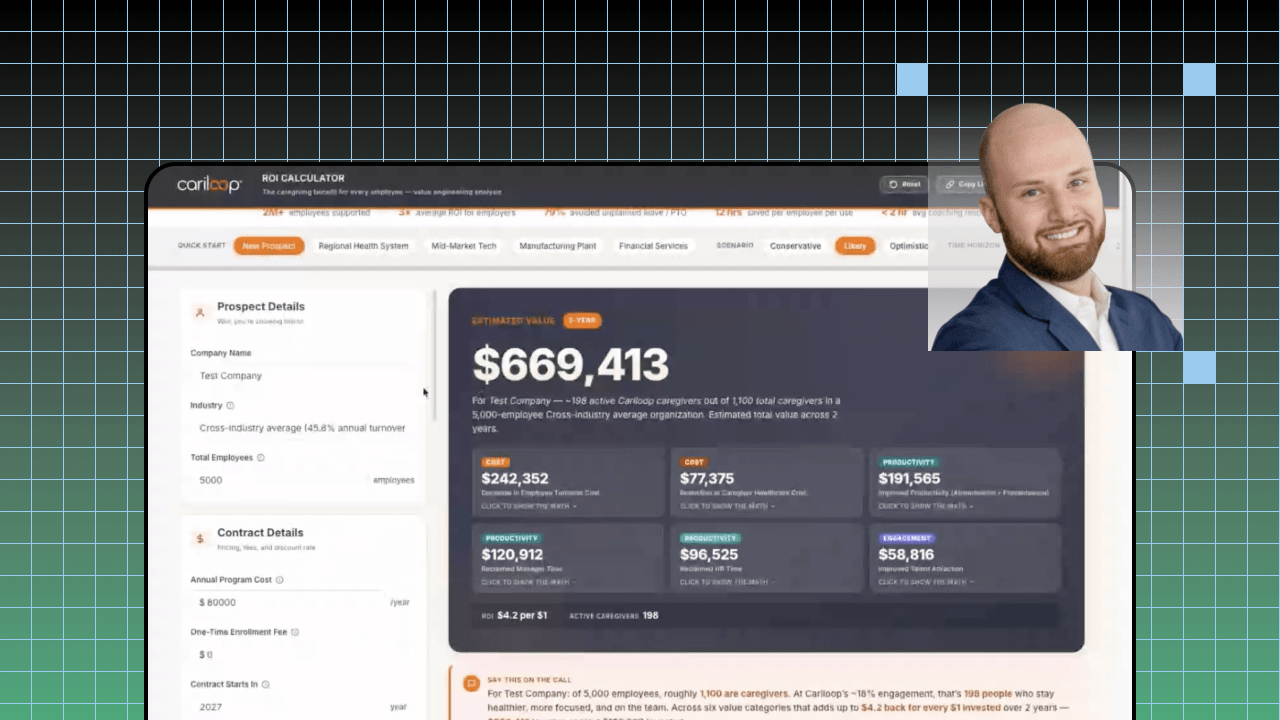
So what did we do? Well, we decided to rebuild it in Domo. "We" is doing a lot of heavy lifting in the title of this slide. I say "we," but I would be taking ninety-nine percent of the credit away where it's actually due, which is to the Domo team. This was part of that five hundred apps challenge that has been talked about. We came to them with this problem and explained all this. In a matter of days, we took something that had been sitting on the side of my desk eating a hole in me for years and built a dynamic, branded ROI calculator right within Domo. The prospect details are right there, and the live value models are right there. We'll show it here in a second. A lot of presets make it very easy, and it's simple enough that our team could use it on the fly without some massive training necessary. With this, it's straightforward. Anyone can use this thing, and there are no more tickets, no more queues. This isn't waiting until days after the call; it's ready to go right there. We're transparent, we're customizable, and we're ready to share this and get it in the hands of the prospect now. The timeliness element was so important here, getting this ready to go.
With that, I'm going to quickly pop over and share my screen. We're going to stop sharing that presentation. You're going to have to look at my ugly mug for two seconds here. And there's the app that's much prettier to look at. Let's do that instead.
With this ROI calculator, the way that this operates is clean, easy, and simple. Doesn't this look much better than the Excel workbook from your nightmares? Input any information you need. A lot of presets are here; this thing is almost ready to go right off the bat. We have the adjustable filters and toggles for different things like different durations, whatever we're customizing for a prospect in terms of details, ready to go.
Additionally, the transparency of using these kind of industry benchmarks but letting you overwrite them—they're all here. You can see exactly what we're doing, where we're getting it from, and why we're using this. But we also tell you and encourage you: change these up, fight us on this. If we're wrong, let's do it. We maintain that transparency rather than having tabs and tabs of math that, while they were transparent, were also a nightmare to look at. See the pretty picture and see the easy number, or understand exactly where it's coming from. It's all right here. It's interactive and it's a click away, ready to go for the value elements here. Again, these are the numbers that CFOs are really looking at, trying to relate in their terms. We're ready to go.
We even added in fun things like, "Hey, if you're a rep on a call, here's your pitch to this." If you can't sell the value of the story, if you can't effectively transmit it, it doesn't matter how cool the tool is or how good the math is; it's not going to hit. We can make that happen right within here.
And then one of my favorite elements of it is a quick little link to download this PDF, and we have a very clean, pretty PDF here that is ready to go. Everything you really need to know is here on the first page, easy for a CFO to pick up and understand all the elements we're doing. You want to get meatier? You want to see the math? You want to see all the pieces in it? We have that too. But this thing is ready to go. The rep did this live. This thing is out the door before the call ends. It's not waiting for days and days within our queue. We're going to stop sharing the app there and pop right back into our presentation here.
And with that, to sum all this up, what this really unlocked is something that sat on the side of my desk for days. It's not just about the value of this tool. I kind of hit on that and hopefully that's been clear in the presentation thus far. It's what it also unlocked, bigger picture, for us. Again, that live element, the prospect's data being right there, being ready to go, and making the sales team the owner and experts of this thing. No longer do they have to call the data team like a "phone a friend" lifeline from Who Wants to Be a Millionaire days. I don't need to explain this stuff. It's all here. You are the expert sales team, you are the leaders, you can go and do this, and you can have the confidence to speak to this. Let the prospects really understand that we as a company really get what we're doing here. We still have that visibility, we still have that transparency, and it's not delivered days later; it's ready to go before the call even ends. Also, that version control—well, that's out the window now. I no longer have to wonder, "Which password is this? Which version was this? Oh no, did I make this update in this version?"
And what that has unlocked, which is kind of the biggest piece for me and my team, is that our efforts are now turned to elevating the story. It's finding new opportunities to advance what we can do with a really small team for a growth-stage company. We're not just pumping out workbooks. We're not stuck in a task list. It's apps on apps on apps is where we're going with this thing. Again, all credit to the Domo team for inspiring me and teaching me how to use some of this stuff that I probably was behind the eight ball on, behind the curve on. And we are doing now a client ROI workbook that's going to be live, a pricing calculator—something that's been stuck in an Excel workbook for years and years—let's make this clean, let's make this easy for everyone to use, coverage maps for our new backup care offerings, all of it in Domo. A lot of this is fed from actual data within Domo. It's really unlocked what we've been able to accomplish.
And I'll end this by summing up: build for the moment the conversation happens. Prepare what you're thinking about to say, not only what it can do on the back end, but how these end users are going to use it, what value you're truly going to unlock, and how you're going to be able to accomplish that.
Prospect momentum dies when your ROI calculation shows up days after the call. Cariloop Senior Director of Data & Analytics Thomas Riley shows how Cariloop solved that by transforming an 8-tab Excel workbook into a dynamic, branded Domo ROI Calculator app built during the 500 Apps challenge. Reps now run live ROI scenarios on calls, show the math with clickable benchmark citations, and generate a clean CFO-ready PDF before the conversation ends.
Domo transforms the way these companies manage business.