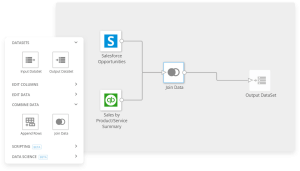
Extract, transform, load (ETL) pipelines form the backbone of modern data operations. They handle everything from extracting raw data across dozens of systems to transforming messy records into clean, analysis-ready datasets. This guide walks through the mechanics of how ETL works, compares ETL and extract, load, transform (ELT) approaches, explores batch and streaming architectures, and shares practical patterns for building pipelines that stay reliable as your data grows. Whether you're designing your first pipeline or optimizing existing workflows, you'll find actionable guidance for each stage of the process.
Key takeaways
Here are the key points to keep in mind:
- An ETL pipeline extracts data from multiple sources, transforms it for consistency and quality, and loads it into a destination system for analysis.
- ETL transforms data before loading, while ELT loads first and transforms in the destination. Choose based on governance needs and data volume.
- Common ETL challenges include data quality issues, scaling large volumes, security compliance, and maintaining observability across pipelines.
- Building effective ETL pipelines requires understanding source systems, practicing data hygiene, scheduling updates, and monitoring continuously.
- When evaluating ETL tools, prioritize connectors, incremental load support, data lineage, security, and fit with your team's technical capabilities.
What is an ETL pipeline?
ETL stands for extract, transform, load. An ETL pipeline extracts raw data from source systems, transforms it into a clean and usable format, and loads it into a destination for analysis. These pipelines allow businesses to combine data from different systems, clean and standardize it, and make it available for reporting and decision-making.
The process starts by pulling raw data from various sources while maintaining its original format. Next comes transformation (cleaning, correcting, formatting, or all of the above) so the data is ready to use. Once transformed, everything comes together in a data warehouse, a database, or a BI tool.
Why bother? ETL pipelines improve data quality by ensuring your data is clean and accurate. They centralize data from multiple sources, creating easily accessible information for the people who use it across the business. Automation saves time and reduces manual work. And when your company is ready to scale, your ETL pipelines scale with you, ensuring you can manage growing data volumes to support data-driven decision-making.
How does an ETL pipeline work?
Understanding the mechanics behind an ETL pipeline helps clarify why each stage matters. Here is how the process unfolds:
- Extracting data: The first step involves gathering data from various sources like databases, files, software tools, data warehouses, or other places. The ETL pipeline needs to connect to these sources, which is typically done through application programming interfaces (APIs), file loads, or database connections such as Open Database Connectivity (ODBC) or Java Database Connectivity (JDBC), where the ETL tool can use Structured Query Language (SQL) queries to extract the correct data. The pipeline extracts data in its original state and can handle structured, semi-structured, or unstructured inputs.
- Transforming and cleaning data: After extraction, the data typically undergoes cleaning and transformation.
- Data cleaning: The cleaning process involves removing duplicates, correcting errors, handling missing values, and standardizing data formats. This step ensures the data is accurate and consistent.
- Data transformation: This involves more complex operations like aggregating data (e.g., summing up sales figures), filtering out irrelevant information, and enriching the data by combining it with other data sources. Data might also be normalized or denormalized, depending on the requirements of the analysis.
- Loading data into target systems: The final step in the ETL process is loading the transformed data into a target system for analysis and reporting. Depending on your business needs, you can load the data in batches or in realtime. For instance, a company might load sales data into a data warehouse so analysts can generate reports and dashboards to gain insights into sales trends and customer behavior.
Core ETL components
Every ETL pipeline relies on a set of foundational components that work together to move and prepare data. Here's what makes up a typical ETL architecture:
- Connectors: APIs, file imports, and database connections that extract data from source systems.
- Transform engine: Cleans, deduplicates, and standardizes data for consistency.
- Orchestration: Handles scheduling, dependencies, and alerts.
- Storage targets: Data warehouses, data lakes, or BI platforms that store the transformed data.
- Governance and quality: Catalogs, lineage, and validation rules that maintain trust.
- Data observability: Logs, metrics, and monitoring that keep teams informed about pipeline performance.
ETL pipeline architecture and types
How should you design your pipeline? That depends entirely on your organization's latency requirements, data volume, and use cases. Understanding these architectural patterns helps you choose the right approach.
At a high level, ETL architecture consists of three layers: the source layer (where data originates), the processing layer (where extraction, transformation, and loading occur), and the destination layer (where clean data lands for consumption). The processing layer can be centralized in a single tool or distributed across multiple services, depending on complexity.
Batch, real-time, and change data capture pipelines
ETL pipelines can run in different modes depending on latency needs.
Batch ETL runs on a schedule, collecting and processing data in groups. It's commonly used for daily or hourly reports where near-instant updates aren't required. Batch processing is often more cost-effective and easier to manage for large historical datasets.
Real-time (streaming) ETL processes data continuously as it's generated. This mode powers live dashboards, alerts, and operational analytics that need instant updates.Streaming ETL is essential for use cases like fraud detection, live inventory tracking, or customer experience monitoring.
Change Data Capture (CDC) captures inserts, updates, and deletes from source systems and applies them incrementally. This keeps data current without the need for full reloads, reducing processing time and compute costs while maintaining data freshness.
ETL transformation types
The data transformation stage is where raw data becomes analysis-ready. Here are the most common transformation types:
- Standardization: Converting data to consistent formats, such as date formats (MM/DD/YYYY to ISO 8601), currency codes, or unit measurements. This ensures data from different sources can be compared and combined.
- Deduplication: Identifying and removing duplicate records based on matching keys or fuzzy logic. Without deduplication, analytics can overcount customers, transactions, or events. Running deduplication only at initial load is a common mistake. Duplicates creep back in through incremental updates, so build deduplication into your ongoing transformation logic, not just your one-time setup.
- Normalization: Restructuring data to reduce redundancy, often by splitting a single table into related tables with foreign keys. This is common when preparing data for relational databases.
- Denormalization: Combining related tables into a single, flattened structure to reduce query time. Data warehouses often prefer denormalized schemas for analytical workloads.
- Enrichment: Adding context by joining source data with reference data, such as appending geographic information to IP addresses or adding product categories to transaction records.
- Aggregation: Summarizing detailed records into higher-level metrics, such as calculating daily sales totals from individual transactions or computing average order values by region.
- Filtering: Removing irrelevant or out-of-scope records, such as excluding test accounts, incomplete entries, or data outside a specific date range.
- Slowly Changing Dimension (SCD) handling: Managing historical changes to dimension data, such as tracking when a customer's address changed while preserving the previous value for historical reporting.
A well-designed transformation layer applies these operations in a logical sequence: standardizing and cleaning first, then enriching and aggregating, and finally validating before load.
ETL vs ELT: What's the difference and when to use each
ETL (extract, transform, load) transforms data before it lands in the destination. It is a strong fit when you need strict governance, complex reshaping, or curated analytics-ready data for a BI tool or warehouse.
ELT (extract, load, transform) loads data first, often into a cloud data warehouse or data lake, and performs transformations there. ELT works well for very large or unstructured datasets because it takes advantage of scalable cloud compute power.
The following table summarizes the key differences:
| Factor | ETL | ELT |
|---|
| Transformation timing | Before loading | After loading |
| Best for | Governed, curated analytics | Large-scale, flexible exploration |
| Governance | Strict upstream control | In-platform governance |
| Scalability | Limited by transform infrastructure | Scales with cloud compute |
| Typical use case | BI reporting, compliance | Data lakes, ML pipelines |
When deciding between the two approaches, consider these guidelines:
- Use ETL when upstream quality and governance requirements are strict, when latency can be scheduled in batches, and when you need trusted data models for reporting.
- Use ELT when you're handling large, diverse datasets and need quick landing of raw data that will be transformed later in-platform.
- Many companies use a hybrid approach: ELT for raw landing and light transformations, ETL for governed and business-ready data marts.
ETL pipeline vs data pipeline
An ETL pipeline is a specific type of data pipeline that always includes transformation.
A data pipeline? Any system that moves data between sources and destinations, whether streaming, replication, event-driven, or batch, with or without transformation.
ETL pipelines are built for analytics and business intelligence. Broader data pipelines can also support operational workflows, application syncs, or real-time event streaming.
Common challenges with ETL pipelines
ETL pipelines can be one of the best ways to make data usable and available. But they come with their own set of challenges (and can amplify problems that already exist in your data or, when not set up correctly, introduce new ones). Common challenges include:
- Data quality and consistency: Combining data from multiple sources often leads to inconsistencies, duplicates, and errors. Different formats and naming conventions can complicate data integration, requiring time-consuming validation and cleaning to ensure accuracy.
- Managing large volumes of data: ETL pipelines can slow down as data grows, making scalability a major challenge. Large datasets demand more resources and infrastructure, so you need more resources to manage and support that data, adding cost and complexity.
- Ensuring data security and compliance: Protecting sensitive data during the ETL process is vital. Teams do this through encryption, developing access controls, and adhering to government regulations. However, data entering the pipeline will include sensitive information. Companies can violate regulatory requirements if strict security controls are not consistently maintained.
- Observability and lineage: As pipelines multiply, troubleshooting issues becomes harder without clear lineage. Tracking job status, data freshness, and field-level lineage helps teams trace and fix problems quickly.
- Cost control: Cloud compute and storage can grow fast. Use incremental loads, pushdown processing, and partition pruning to manage costs effectively.
Benefits of ETL pipelines
Clean, trustworthy data that fuels analytics and machine learning. Quicker access to insights through automation and reduced manual work. A single, consistent view of business data across systems. Stronger compliance and governance through standardized processes. Scalability to handle growing data volumes and new sources.
Best practices for building an ETL pipeline
Choosing the right ETL tools
Whether your company has been using ETL and needs to develop new processes or is starting to create more efficient ways to ingest data, you can follow the same guidelines for building an ETL pipeline.
Your choice depends on your company's specific needs. Think through how you'll need to use your data, what types of data you'll need to transform, and what sources you'll need to connect to your ETL pipeline. Choosing the right tool will depend on the following factors:
- Data volume
- Complexity
- Processing speed your company requires
Once you've identified tools that meet those basic needs, narrow down your options by analyzing the data fluency across your organization. Are many people in your company familiar with data, SQL, and development tools? Then you can probably get a more complex ETL tool that allows for customizations. If data literacy is low at your company, look for tools with user-friendly features like drag-and-drop interfaces.
Then, look at which tools will integrate best with your systems. Some tools have libraries of connectors that allow you to easily and quickly connect your data with your ETL pipeline.
Designing a scalable and efficient pipeline
To design a scalable and efficient pipeline, consider the following steps:
- Understand where the data is coming from: Knowing the source systems you want to extract data from is essential when starting a data pipeline. To be effective, make sure you fully understand the pipeline requirements, such as what data is needed, from what systems, and who will be using it.
- Practice good data hygiene and transformation: Pulling data from different systems can become quite messy. Data hygiene is the collective process to ensure the cleanliness of data. Data is considered clean if it is relatively error-free. Dirty data can be caused by a number of factors including duplicate records, incomplete or outdated data, and the improper parsing of record fields from disparate systems. Teams may also need to transform data to meet business requirements. These transformations can include joining, appending, creating calculations, or summarizing the data.
- Know where you're storing the data: Every ETL pipeline needs a defined destination where data can land once imported, cleaned, and transformed. Storing data is critical to any ETL process because it ensures the data can be used when needed. Common data storage methods include data lakes, data warehouses, cloud storage, and modern BI tools.
- Schedule updates: After completing the initial setup of your ETL pipeline, it's important to understand how often you'll need it to run and which stakeholders will need access to the data. Many data pipelines run on cron jobs, which is a scheduling system that lets a computer know what time a process should be kicked off. Modern ETL tools have a range of scheduling options from daily to monthly to even every 15 minutes.
- Monitor and troubleshoot the ETL processes: Once an ETL pipeline is created, it is never truly finished. Creating a data pipeline is an iterative process, and small changes will need to be made over time. For example, a new field could be introduced from the source system that will need to make its way into the BI tool downstream. Good documentation and training help teams make small changes quickly.
Beyond these foundational steps, keep these additional best practices in mind:
- Use source-aligned staging and curated models (often called bronze, silver, and gold layers).
- Validate early by checking schema, datatypes, and nulls.
- Prefer incremental or CDC loads instead of full reloads.
- Centralize transformation logic so it's reusable and well-documented.
- Enforce governance with role-based access, data masking, and audit logs.
- Monitor jobs, record counts, freshness, and error rates to keep data pipelines healthy.
Incremental ETL design patterns
Full reloads work for small datasets, but they become expensive and slow as data grows. Incremental ETL strategies keep pipelines efficient by processing only what has changed.
Timestamp watermarks track the maximum timestamp from the previous run and extract only records with a newer timestamp. This works well for append-only tables with reliable createdat or updatedat columns. If your source system allows backdated records or late-arriving updates, timestamp watermarks alone will miss them (consider combining this approach with periodic full reconciliation runs).
Change Data Capture (CDC) reads database transaction logs to capture inserts, updates, and deletes as they happen. CDC provides near-real-time updates without querying the source table directly, reducing load on production systems.
Snapshot diffing compares the current state of a table against a previous snapshot to identify changes. This approach works when source systems lack timestamps or CDC support, though it requires storing and comparing full snapshots.
Upsert/merge operations use MERGE or upsert statements to insert new records and update existing ones in a single operation. This pattern ensures idempotency, meaning running the same load twice produces the same result.
Each pattern has tradeoffs. Timestamp watermarks are simple but miss deleted records. CDC captures everything but requires infrastructure setup. Snapshot diffing handles any source but consumes more storage and compute.
Handling late-arriving data and backfills
Data doesn't always arrive on time. Network delays, batch processing windows, and upstream system outages can cause records to show up after their expected window. Designing for late arrivals prevents data gaps and inconsistencies.
For late-arriving data, consider these approaches:
- Replay windows: Reprocess a rolling window of recent data (such as the last 24 or 48 hours) on each run to catch late arrivals. This adds compute cost but ensures completeness.
- Event-time processing: Use the timestamp embedded in the data (event time) rather than when it arrived (processing time) to assign records to the correct partition or aggregation window.
- Tombstone records: For CDC pipelines, propagate delete markers through downstream tables so deletions are reflected even when they arrive late.
For backfills (reprocessing historical data after schema changes, bug fixes, or new transformation logic):
- Partition by date: Organize data into date-based partitions so you can reprocess specific time ranges without touching the entire dataset.
- Idempotent loads: Design transformations so running them multiple times produces the same output. This makes backfills safe to retry without creating duplicates.
- Parallel processing: Break large backfills into smaller chunks that can run concurrently, reducing total processing time.
Document your backfill procedures and test them before you need them. A well-rehearsed backfill process turns a potential crisis into a routine operation.
Data quality and validation in ETL pipelines
Data quality is not something you check once and forget. It requires validation at multiple stages of the pipeline, with clear rules about what happens when checks fail.
Where to validate
Quality checks belong at three points in the pipeline:
- At extraction: Verify that source connections are healthy, expected tables exist, and row counts fall within expected ranges. Catching issues here prevents wasted processing downstream.
- During transformation: Check for nulls in required fields, validate data types, enforce referential integrity, and flag records that fail business rules. This is where most data quality logic lives.
- Before loading: Run final reconciliation checks comparing source and destination row counts, verify that aggregations match expected totals, and confirm that no duplicate keys exist in the target.
What to test
Effective data quality testing covers several dimensions:
- Completeness: Are required fields populated? Are expected records present?
- Uniqueness: Are primary keys actually unique? Are there unexpected duplicates?
- Validity: Do values fall within expected ranges? Do codes match reference tables?
- Consistency: Do related fields agree with each other? Do totals match detail records?
- Timeliness: Is data arriving within expected windows? Are timestamps reasonable?
How to respond to failures
Not all quality issues deserve the same response. Define clear policies for different severity levels:
- Block the load: For critical issues like duplicate primary keys or missing required fields, stop the pipeline and alert the team. Bad data in production causes more problems than delayed data.
- Route to quarantine: For records that fail validation but should not block the entire load, move them to a separate table for review and remediation.
- Log and continue: For minor issues like unexpected null values in optional fields, log the anomaly for investigation but allow the load to proceed.
- Alert on thresholds: Set acceptable ranges for metrics like null rates or row count changes. Alert when values exceed thresholds, even if individual records pass validation.
Document your quality rules, make them visible in your pipeline code or configuration, and review them regularly as business requirements evolve.
Security and governance in ETL pipelines
ETL pipelines move sensitive data across systems. A breach or compliance violation during data movement can be just as damaging as one in a production database.
Access control
Limit who can access data at each stage of the pipeline:
- Role-based access control (RBAC): Assign permissions based on job function. Data engineers may need full access to transformation logic, while analysts only need read access to curated outputs.
- Attribute-based access control (ABAC): Apply dynamic rules based on data attributes. For example, restrict access to records from specific regions based on the user's location or department.
- Service accounts: Use dedicated service accounts for pipeline execution with minimal necessary permissions. Avoid using personal credentials in automated processes.
Data protection
Protect sensitive data throughout its journey:
- Encryption in transit: Use Transport Layer Security (TLS) for all connections between source systems, ETL tools, and destinations. Never transmit sensitive data over unencrypted channels.
- Encryption at rest: Ensure staging areas, intermediate files, and destination systems encrypt stored data. This protects against unauthorized access to storage systems.
- Masking and tokenization: Replace sensitive values like social security numbers or credit card numbers with masked or tokenized versions before they leave the source system when possible. If sensitive data must flow through the pipeline, mask it as early as feasible.
- Data minimization: Extract only the fields you need. Avoid pulling entire tables when a subset of columns would suffice.
Lineage and auditability
Maintain clear records of how data moves and transforms:
- Field-level lineage: Track which source fields contribute to each destination field. This helps with impact analysis when sources change and supports compliance inquiries.
- Transformation logging: Record what transformations were applied, when, and by which version of the pipeline code. This supports debugging and audit requirements.
- Retention policies: Define how long to keep pipeline logs, intermediate data, and historical snapshots. Balance audit requirements against storage costs and privacy regulations.
Compliance considerations
Different regulations impose specific requirements on data handling:
- General Data Protection Regulation (GDPR): Requires the ability to delete personal data on request. Design pipelines so deletion requests can propagate through derived tables and aggregations.
- Health Insurance Portability and Accountability Act (HIPAA): Requires audit trails for access to protected health information. Ensure pipeline logs capture who accessed what data and when.
- System and Organization Controls 2 (SOC 2): Requires documented controls for data security. Maintain documentation of your pipeline security measures and review them regularly.
Build compliance into your pipeline design from the start. Retrofitting governance controls? More expensive and error-prone than designing them in.
ETL pipeline examples and use cases
ETL pipelines are valuable for businesses because they bring data together. Companies that establish ETL pipelines get a view into their operations, sales, marketing, or a critical combination of all data to ensure they're able to see the big picture. By taking time to connect data from a variety of sources, these companies use ETL pipelines to improve business outcomes:
- A retail company uses ETL pipelines to connect data from critical tools like Quickbooks, Google Drive, and Google Analytics. By bringing in data across the organization, the CEO no longer has to wait for individual employees to build reports and share them up the chain. They can see all the data they need to make business-forward decisions in one place, automatically updated through the ETL pipelines, and easily combined with other important data.
- A technology company provides software solutions for companies needing payment processing. Before bringing their data into one place, it was a manual process to track down disparate and siloed data sources, and many people questioned the accuracy of the data. By connecting data through ETL pipelines into a BI platform, the company built trust in the data and got insights within a matter of weeks, eliminating the need for costly and time-intensive manual reports.
- A global supply chain management company had a problem with data sources and siloed data across departments, regions, and tools. Often, teams wanting to analyze data were spending massive amounts of effort trying to track it down without knowing what data was available. Useful data was spread out across hundreds of different systems. In one warehouse, teams spent 90 minutes twice a day downloading files and organizing them to help determine daily priorities. By building ETL pipelines that automatically ingested, analyzed, and formatted data into useful dashboards, this company increased productivity and saved massive amounts of time.
These companies are not outliers. Using ETL pipelines to bring in data, transform it into functional and usable information, and load it into a platform or tool for further analysis can benefit organizations across industries. Consider the following examples:
Sales data from CRM
An extremely common use case for ETL pipelines is automating the data in customer relationship management (CRM) systems. CRM tools regularly update vast amounts of data about customers.
An ETL pipeline can automate the reporting for customer accounts and opportunities in the sales pipeline. Once the pipeline pulls data from the CRM, teams can combine it with finance, customer success, or marketing data. Then, teams can load the data into a BI tool for further analysis.
Logistics data from ERP system
Enterprise resource planning (ERP) software remains a huge use case for ETL pipelines. These transactional databases can contain info about your business, such as orders, shipping, procurement, and financial data. Understanding this data can be critical to your company's success.
A key consideration when working with data from ERP systems is the data modeling relationships between tables. Oftentimes, these can be complex for systems that process inventory and orders. ETL pipelines can use automation to remove this complexity by creating a data model once, and then running the data through that model for subsequent jobs.
Product data from back-end databases
Businesses also store large amounts of data in databases. These databases can contain information about products, employees, customers, and many other things. A great example is software companies that use back-end databases to store information about the people who use their software and its configuration.
Databases can be massive in size and complexity. An ETL pipeline tool can create scalable processes even when billions or trillions of rows are added to the database. The power of automating this much data can provide massive insights into your business. People across the business can also analyze this data in a BI tool.
Worked example: SaaS application to data warehouse
To illustrate how these concepts come together, consider a company that needs to analyze customer usage data from a software as a service (SaaS) application alongside billing data from Stripe.
The extraction phase pulls data from two sources: an API call to the SaaS application retrieves user activity events (userid, eventtype, timestamp, metadata), while a Stripe connector extracts subscription and payment records (customerid, plan, amount, paymentdate).
During transformation, the pipeline performs several operations:
- Standardizes timestamps from both sources to Coordinated Universal Time (UTC)
- Maps SaaS userid to Stripe customerid using a lookup table
- Filters out internal test accounts and incomplete records
- Aggregates daily active users and calculates monthly recurring revenue
- Joins usage metrics with billing data to create a unified customer health score
The load phase writes the transformed data to a data warehouse, creating two tables: a dailycustomermetrics fact table and a customer_health dimension table. The pipeline runs on a daily schedule, using timestamp watermarks to process only new records since the last run.
This pattern (combining multiple sources, standardizing formats, enriching through joins, and loading to a warehouse) represents the core value of ETL: turning scattered operational data into unified analytical assets.
What to look for in an ETL pipeline tool
ETL pipelines help teams turn scattered source records into usable data for reporting, planning, and automation. As you evaluate ETL tools, focus on how each option reduces manual data prep and helps your team trust the data it uses every day. Consider the following criteria as you evaluate tools:
- Cost: Make sure you understand the total cost of ownership, including licensing fees, infrastructure costs, ongoing charges for feeds, and potential hidden expenses like support or additional features.
- Scalability: You're only going to produce more data and will need your data to support more complex processes. Your ETL tool needs to be able to grow with your data needs. Do not just focus on what you need ETL pipelines to do today; try to understand your future capabilities for your data.
- Ease of use: Democratizing data across your company to experienced and non-technical people will have a dramatic impact. While the initial setup may be done by an IT team, look for tools that can be used by non-technical team members.
- Integration: Your ETL pipeline won't do you much good if you have to spend a ton of resources connecting every system manually. Find a tool that has pre-built connectors to your most important software solutions, data warehouses, and databases so you can keep your ETL pipeline relevant.
When evaluating specific tools, use this rubric to guide your decision:
- Must-haves: The right connectors, incremental load or CDC support, data lineage tracking, and strong security.
- Nice-to-haves: Visual design options, SQL and scripting support, version control, and cost monitoring.
- Team fit: Choose drag-and-drop simplicity for less technical people or developer-friendly platforms with advanced customization for technical teams.
How Domo simplifies ETL pipelines
Build reliable pipelines with visual transforms, 1,000+ connectors, and built-in governance. Try Domo free or watch a three-minute demo to see it in action.