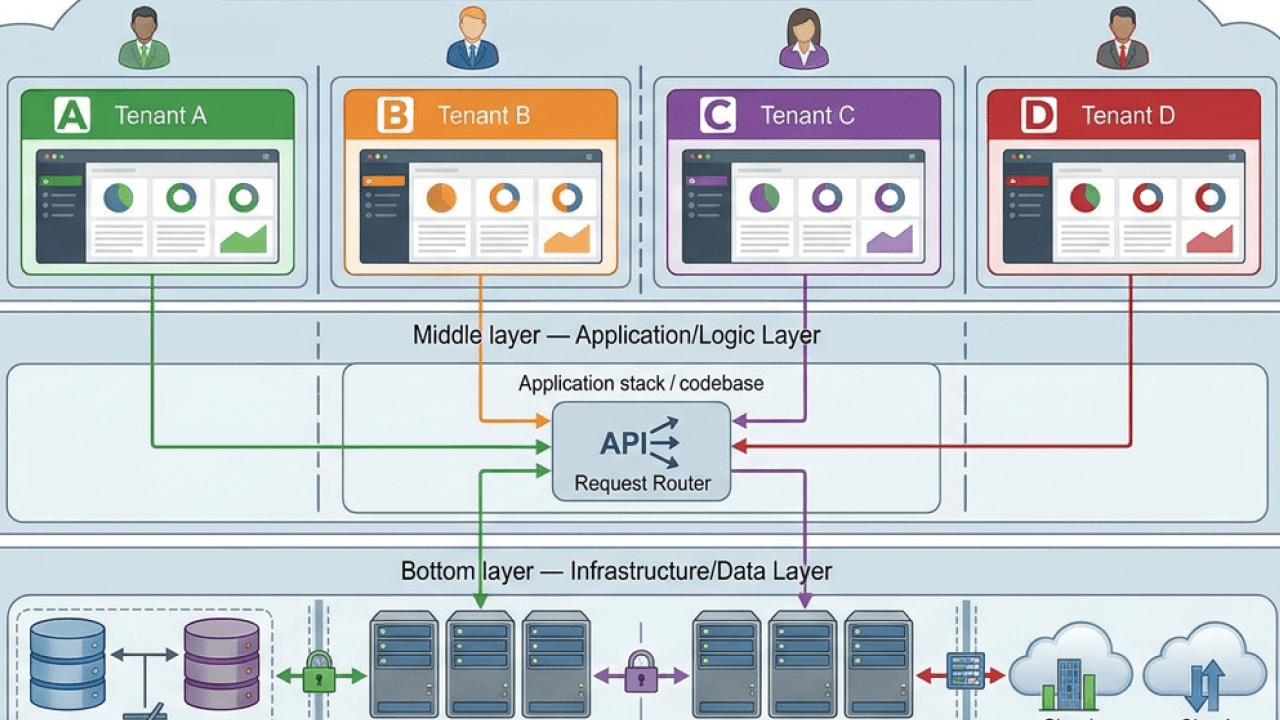
Companies getting measurable outcomes from AI are building workflows, not just adding chatbots. An AI workflow is a sequence of steps that uses artificial intelligence to automate, optimize, or support decisions inside a business process. This guide walks through how AI workflow automation works, high-impact use cases by department, platform comparisons, governance requirements, and a step-by-step implementation roadmap.
Key takeaways
Here are the main points to keep in mind:
- AI workflow automation combines traditional process orchestration with AI capabilities like classification, summarization, and generation to handle tasks that rules alone cannot
- The most successful AI workflows include governance guardrails, human-in-the-loop checkpoints, and clear success metrics from day one
- High-impact use cases span HR onboarding, customer support triage, marketing operations, finance invoice processing, and sales lead qualification
- Choosing the right platform depends on your integration needs, governance requirements, and whether you need an end-to-end solution or point tools
- Start small with one measurable workflow, iterate in two-week cycles, then scale what works into reusable templates
What is AI workflow automation?
AI workflow automation is the practice of embedding artificial intelligence into business processes to handle tasks that traditional rule-based systems cannot. Where conventional automation follows rigid if-then logic, AI workflow automation can interpret unstructured inputs, make probabilistic decisions, and adapt to exceptions without requiring a human to manually code every scenario.
The distinction matters. Modern business processes rarely fit neatly into predetermined rules. Customer requests come in messy formats. Documents contain variations. Exceptions are constant. AI workflow automation addresses this by adding intelligence to the orchestration layer.
The following table clarifies how AI workflow automation compares to related approaches:
| Approach | Decision Logic | Data Type | Adaptability | Example |
|---|
| Traditional automation | Deterministic rules (if X, then Y) | Structured fields | None without reprogramming | Route invoice to AP if amount < $500 |
| RPA | UI-based rules | Structured screens | Limited to trained scenarios | Copy data from email to CRM field |
| ML pipeline | Statistical models | Training data | Learns from labeled examples | Predict churn probability |
| AI workflow | Rules + probabilistic AI | Structured and unstructured | Adapts to exceptions via context | Classify free-text ticket, draft response, route by confidence |
AI workflow automation vs traditional workflow automation
Traditional workflow automation usually relies on rules and deterministic logic (if X happens, then do Y). AI workflows can still include rules, but they also incorporate AI for tasks that are hard to fully specify in advance, like understanding natural language requests, classifying free-text, extracting entities, spotting anomalies, or recommending the "next best action." They learn and adapt based on data rather than only rigid rules.
AI workflow automation vs RPA
Robotic process automation (RPA) automates repetitive user interface (UI) or rules-based tasks. AI workflows often combine RPA-style actions with AI that can handle ambiguity and exceptions. The key difference: AI-driven automation learns from experience and context rather than following fixed-rule automation.
AI workflow automation vs ML pipelines
A machine learning (ML) pipeline is usually focused on model development and deployment (data prep → training → evaluation → inference). An AI workflow is broader. It's the business process that surrounds and uses AI. The ML pipeline might be one step inside the workflow. A common misconception is treating them as interchangeable, but the pipeline handles model mechanics while the workflow handles business orchestration.
AI workflows vs AI agents
You'll hear these together a lot. A practical way to separate them: the workflow is the orchestration and guardrails (the process map), while the agent is the AI-powered worker inside one or more steps (reasoning plus tools).
Some platforms embed agents as steps inside workflows. Domo's documentation explains that an AI agent embedded in a workflow step can analyze inputs, make context-aware decisions, and execute actions to reduce manual effort.
{{custom-cta-1}}
Why AI workflow automation matters in 2026
Most business processes are already "workflows," even if they don't live in a workflow tool: onboarding a customer, triaging a support request, approving spend, closing the month, refreshing dashboards, responding to security alerts.
The challenge? Work is spread across dozens (or hundreds) of apps. Data is fragmented. Exceptions are constant. Decisions require context that lives in documents, tickets, emails, and dashboards, not just in structured fields.
That's where AI helps most. AI workflows can:
- Reduce manual effort by 40-60 percent on high-volume processes like ticket triage and invoice processing (this range represents the difference between partial automation where AI assists but humans complete, and full automation where AI handles end-to-end with oversight)
- Improve decision speed by summarizing context, detecting patterns, and proposing actions in seconds rather than hours
- Increase consistency with embedded policies, guardrails, and approvals that enforce standards across every transaction
- Lower automation costs by reserving AI for reasoning steps (organizations that apply AI selectively rather than universally report significantly lower per-run costs)
The measurement and ROI section later in this guide covers how to quantify these benefits for your organization.
How AI workflow automation works
Most AI workflows follow a repeatable seven-step pattern. Understanding this framework helps you design workflows that are reliable, governable, and measurable, regardless of which platform you use.
- Trigger: A ticket arrives, a row changes in a dataset, a threshold is crossed, a form is submitted, or a schedule hits 9 am. The trigger defines when the workflow activates.
- Decision point: Is this a real-time event trigger or a scheduled batch? Real-time suits customer-facing processes; batch works for reporting and reconciliation.
- Common failure: Triggers that fire too broadly, creating noise and wasted compute.
- Context assembly: Pull relevant structured data (customer relationship management (CRM) fields, order history, HR system data), retrieve unstructured context (policy docs, call transcripts, emails, knowledge base), and add user/org context (role, region, permissions).
- Decision point: What's the minimum context needed for accurate AI output? More context improves accuracy but increases latency and cost.
- Common failure: Missing context leads to generic or incorrect AI outputs; too much context overwhelms the model.
- AI step(s): Classify, extract, summarize, predict, generate, recommend, or decide. Optionally call tools/functions (send message, update a record, create a ticket).
- Decision point: Which AI capability fits the task? Classification for routing, extraction for documents, generation for drafts.
- Common failure: Using AI where a simple rule would suffice, adding cost without value.
- Validation and guardrails: Validate outputs against schemas, check for banned phrases or policy violations, and route by confidence score.
- Decision point: Set confidence thresholds. Below 0.7 routes to human review, 0.7-0.9 creates a draft for approval, above 0.9 auto-executes.
- Common failure: No validation layer, allowing hallucinated or non-compliant outputs to reach production.
- Human-in-the-loop (when needed): Review, approve, edit, or override. Provide feedback that improves prompts, routing, or training data.
- Decision point: Which actions require human approval? External communications, financial transactions, and access changes typically need gates.
- Common failure: Making review painful so it becomes a bottleneck or gets skipped.
- Action and system updates: Create/update records in systems of record, notify stakeholders, and write back outcomes so the workflow can be measured.
- Decision point: Which system is the source of truth? Write to that system first.
- Common failure: Partial updates that leave systems out of sync.
- Monitoring and learning: Track cycle time, error rates, deflection, rework, and ROI. Iterate prompts, retrieval sources, and decision rules based on outcomes.
- Decision point: What's the review cadence? Weekly for new workflows, monthly for mature ones.
- Common failure: No feedback loop, so the workflow never improves.
Here's how these seven steps play out in a support ticket triage workflow:
- Trigger: New ticket submitted via web form
- Context assembly: Pull customer tier, recent tickets, product version, and relevant knowledge articles
- : Classify urgency (high/medium/low), detect product area, draft initial response
- Validation: Check confidence score; flag if below 0.7 or if ticket mentions legal/compliance terms
- Human-in-the-loop: Agent reviews flagged tickets, edits draft responses for high-value customers
- Action: Send response, update CRM with category and resolution path
- Monitoring: Track first-response time, deflection rate, customer satisfaction
This same seven-step pattern maps to any workflow platform (Zapier, n8n, Make, Workato, or Domo). The tools differ in how they implement each step, but the underlying logic remains consistent.
{{custom-cta-2}}
Core components of AI workflows
While implementations vary, most AI workflows rely on a few common building blocks.
Data and integration layer
AI is only as helpful as the context it can access securely. IBM calls out application programming interfaces (APIs) as a key component because they enable systems to communicate and exchange data and functions.
What this means in practice:
- Connectors to systems of record, such as customer relationship management (CRM), enterprise resource planning (ERP), human resources information systems (HRIS), and IT service management (ITSM) platforms
- Event triggers and webhooks
- Read/write access patterns with permissions
The breadth of pre-built connectors often determines how quickly you can deploy a workflow. Platforms with hundreds of native integrations reduce custom development; those with fewer require more API work.
Orchestration layer
This is the "map" of your business process:
- Steps, branching logic, retries, and exception handling
- State management (where is this request in the process?)
- Service-level agreement (SLA) timing (wait steps, timers, escalations)
AI capabilities
Common AI tasks inside workflows include:
- Natural language processing (NLP): intent detection, entity extraction, routing
- Summarization: compressing threads, tickets, calls into decisions
- Classification: priority, sentiment, category, compliance risk
- Generation: drafting emails, responses, briefs, status updates
- Forecasting and anomaly detection: spotting unusual patterns in data
- Recommendation: next best action, suggested assignee, suggested offer
Governance and safety
You need guardrails around:
- Data access and least privilege
- Logging and audit trails
- Prompt hygiene and output validation
- Human approval gates for high-risk actions
Measurement
If you can't measure it, you can't scale it:
- Time-to-resolution, cycle time, and throughput
- Quality scores (customer satisfaction (CSAT), accuracy, compliance)
- Automation rate vs assisted rate vs escalated rate
- Cost savings and productivity gains
When to use AI vs rules
The core promise of AI workflow automation is handling what rules cannot. But knowing when to apply AI (and when a simple rule suffices) separates efficient workflows from expensive ones.
Use this decision matrix to guide your approach:
| Input Type | Risk Level | Recommended Approach |
|---|
| Structured | Low | Rules only, no AI needed |
| Structured | High | Rules with AI-assisted validation |
| Unstructured | Low | AI with automated execution |
| Unstructured | High | AI with mandatory human approval |
A practical heuristic: if you can write the rule in one sentence, don't use AI. Reserve AI for tasks where the input varies, the decision requires judgment, or exceptions are frequent.
The following table shows common AI task patterns with their typical applications:
| Pattern | Example Input | Expected Output | Typical Failure Mode | How to Evaluate |
|---|
| Classify | Free-text support ticket | Category + urgency score | Misclassifies edge cases | Accuracy on labeled test set |
| Extract | Multi-format invoice PDF | Structured fields (vendor, amount, date) | Misses fields in unusual layouts | Field-level extraction rate |
| Summarize | 45-minute call transcript | 3-paragraph summary with action items | Omits key decisions | Human review of completeness |
| Route | Inbound lead form | Assigned rep + priority | Routes to wrong team | Routing accuracy vs manual baseline |
| Generate | Customer context + template | Personalized email draft | Generic or off-brand tone | Human edit rate |
| Detect anomaly | Transaction stream | Flagged outliers with explanation | False positives overwhelming reviewers | Precision/recall balance |
When AI beats rules:
- Free-text ticket triage where customers describe issues in dozens of different ways
- Multi-format invoice extraction where vendors use different layouts, fonts, and field placements
- Email intent detection where the same request can be phrased as a question, complaint, or statement
- Exception handling where the "right" action depends on context that can't be fully enumerated
Retrieval-augmented generation (RAG) reduces hallucination risk by grounding AI outputs in your approved knowledge sources. Rather than generating answers from training data alone, the AI retrieves relevant documents (policies, product specs, past resolutions) and cites them in its response.
AI workflow automation examples by business function
Below are practical, high-impact examples you can use as inspiration. A helpful litmus test: if it has a trigger, a repeatable set of steps, and clear outcomes, it's a strong workflow candidate.
| Example | Department | Complexity | Primary AI Task |
|---|
| Employee onboarding | HR/IT | Medium | Policy interpretation, access provisioning |
| Customer support triage | Support | Medium | Classification, response generation |
| Marketing operations | Marketing | Medium | Anomaly detection, summarization |
| Invoice exceptions | Finance | Medium | Extraction, validation |
| Lead qualification | Sales | Low-Medium | Scoring, routing |
| IT access provisioning | IT | Medium | Policy matching, approval routing |
| Contract review | Legal | High | Extraction, risk flagging |
| Churn risk detection | Customer Success | Medium | Prediction, alert generation |
Employee onboarding (HR and IT)
Goal: Reduce time-to-productivity and eliminate access errors.
Before AI workflow automation, onboarding a new hire typically involved 15-20 manual handoffs between HR, IT, and the hiring manager, with access provisioning taking three to five days and frequent errors in permission assignments.
- Trigger: HR creates a new hire record
- : Role, department, start date, location, manager
- : Check onboarding checklist based on role and region (policy plus compliance differences); draft personalized onboarding plan
- : HRIS, identity management, email, calendar
- : Elevated permissions require manager approval
- Risk level: Medium (access errors can create security or compliance issues)
- Key performance indicator (KPI): Time to full access, access error rate
Organizations implementing this pattern typically reduce onboarding time from days to hours while cutting access-related errors by 50 percent or more. That reduction matters because access errors create security vulnerabilities and delay new hire productivity during the critical first week.
Customer support triage and resolution
Shorter first-response time, clearer routing, higher deflection. Those are the goals.
- Trigger: New ticket/chat/email arrives
- Input: Customer message, account history, product context
- : Classify issue type, urgency, sentiment, and product area; retrieve relevant knowledge articles; draft suggested response
- : Helpdesk, CRM, knowledge base
- : Low-confidence or high-risk tickets route to agent with draft
- Risk level: Medium (customer-facing communication)
- : First-response time, deflection rate, CSAT
Where AI helps most: summarization and context retrieval, drafting replies and recommended steps, detecting compliance-sensitive content.
Marketing operations and campaign performance
Goal: Shorter insight-to-action loops.
- Trigger: Daily schedule or KPI threshold (e.g., cost per lead spikes 25 percent week over week)
- : Spend, conversion, attribution, and creative performance data
- : Summarize what changed, why it likely changed, and what to do next; create tasks for underperforming campaigns
- : Ad platforms, analytics, project management
- : Budget-impacting actions require review
- Risk level: Medium (budget implications)
- : Time from anomaly to action, campaign performance improvement
Where AI helps most: explaining "why" behind KPI changes (with retrieved context like audience shifts, creative fatigue), generating stakeholder-ready summaries.
Finance invoice exceptions and approvals
Goal: Reduce exceptions, shorten approval cycles.
- Trigger: Invoice received or flagged
- Input: Invoice document (PDF, email, scan)
- : Extract invoice fields (vendor, amount, PO, dates); match to PO and receiving data; flag anomalies (duplicate patterns, unusual amounts)
- : accounts payable (AP) system, ERP, document storage
- Human gate: Flagged invoices route for review with explanation
- Risk level: High (financial accuracy)
- : Exception rate, approval cycle time, duplicate payment rate
Where AI helps most: extracting and normalizing messy invoice data, detecting unusual patterns and explaining flags, drafting clarification requests.
Sales lead qualification and routing
Get the right leads to the right reps quickly. That's the whole game.
- Trigger: Inbound lead form submission
- Input: Form data, firmographic enrichment, behavioral signals
- AI step: Score and explain qualification (ideal customer profile (ICP) match plus intent signals); route to rep; draft outreach email and call notes
- Tools: CRM, enrichment providers, email
- Human gate: Unqualified leads route to nurture sequence
- Risk level: Low-Medium
- KPI: Lead-to-opportunity conversion, time to first contact
Domo's AI Agent Task example in its support docs includes a lead qualification scenario, with instructions for assigning leads and sending notifications.
IT access provisioning
Goal: Fulfill access requests accurately without manual review for standard cases.
- Trigger: Access request submitted via service portal
- Input: Request details, requester role, manager, requested system
- AI step: Match request to policy (standard vs. elevated access); check for conflicts or separation-of-duties violations; draft approval request or auto-provision
- Tools: ITSM, identity management, policy repository
- Human gate: Elevated or conflicting access requires security review
- Risk level: High (security implications)
- KPI: Request fulfillment time, policy violation rate
Contract review
Goal: Accelerate contract review by flagging non-standard terms.
- Trigger: Contract uploaded for review
- Input: Contract document, standard terms template, risk thresholds
- AI step: Extract key terms (payment, liability, termination); compare to standard terms; flag deviations with risk scores
- Tools: Contract management system, document storage
- Human gate: All flagged terms require legal review; standard contracts can proceed
- Risk level: High (legal and financial exposure)
- KPI: Review cycle time, flagged-term accuracy
Churn risk detection
Identify at-risk accounts before they churn and trigger retention actions.
- Trigger: Weekly batch or real-time usage threshold
- Input: Product usage data, support ticket history, billing status, engagement scores
- AI step: Calculate churn probability; identify contributing factors; generate account summary for customer success manager (CSM)
- Tools: Product analytics, CRM, support system
- Human gate: High-risk accounts trigger CSM outreach task
- Risk level: Medium
- KPI: Churn prediction accuracy, retention rate for flagged accounts
Common AI workflow patterns you can reuse
If you're designing a library of workflows, these patterns show up everywhere:
- Triage → route → draft → approve → act
- Detect anomaly → explain → recommend → approve → remediate
- Extract → validate → enrich → update system of record
- Summarize → decide gate → notify stakeholders
- Self-serve request → fulfill → confirm → log
The magic is rarely in a single model call. It's in how you orchestrate steps, tool calls, and human review.
Best AI workflow automation tools in 2026
The AI workflow automation market has matured rapidly, with tools ranging from no-code platforms designed for people in business roles to developer-centric frameworks built for complex enterprise orchestration. Choosing the right platform depends on your technical resources, integration requirements, and governance needs.
How to evaluate AI workflow platforms
When assessing AI workflow automation tools, consider these criteria:
- Integration breadth: How many pre-built connectors exist for your systems of record? Can the platform connect to your CRM, ERP, HRIS, and data warehouse without custom development?
- AI capabilities: Does the platform offer native AI features (classification, summarization, generation) or require you to bring your own models?
- Governance controls: Can you enforce approval gates, audit logging, and role-based access? This matters especially for regulated industries.
- Ease of use: Who will build and maintain workflows? No-code interfaces work for people in business roles; developer platforms offer more flexibility but require technical resources.
- Scalability: Can the platform handle enterprise volume without performance degradation?
- Pricing model: Is pricing based on tasks, people, or compute? Understand how costs scale with adoption.
Tool comparison at a glance
The following table compares popular AI workflow automation platforms across key evaluation criteria:
| Tool | Best For | AI Capabilities | Governance | Pricing Tier |
|---|
| Zapier | No-code simplicity, SMB | Basic AI actions, OpenAI integration | Limited audit trails | Free tier available; paid from $20/month |
| n8n | Developer flexibility, self-hosted | Bring your own model, AI nodes | Self-hosted control | Free (self-hosted); cloud from $20/month |
| Make | Visual workflow design, mid-market | AI modules, scenario branching | Team permissions | Free tier; paid from $9/month |
| Workato | Enterprise integration, IT teams | AI-powered recipe suggestions | Enterprise-grade audit, SOC 2 | Custom enterprise pricing |
| Domo | Enterprise orchestration with governed AI | Native AI agents, model-agnostic (OpenAI, Google, Anthropic), anomaly detection | SOC 2, HIPAA compliant, human-in-the-loop controls | Custom enterprise pricing |
Use this decision tree to narrow your options:
- Do you need self-hosting for data residency? → Consider n8n, but compare the added setup and governance work with Domo if you need built-in controls.
- Is your team non-technical and budget-conscious? → Start with Zapier or Make, but note that governance and more complex orchestration can push teams toward Domo later.
- Do you need enterprise-grade audit trails and Service Organization Control 2 (SOC 2) reporting? → Evaluate Workato or Domo, and compare how much governed data access and human-in-the-loop control each gives you.
- Are your workflows data-intensive with analytics triggers? → Domo's data-native approach reduces integration complexity
Domo differentiates by combining workflow orchestration with its data platform, meaning workflows can act on governed, unified data rather than requiring separate integration layers. For organizations already managing data in Domo or needing tight governance over AI actions, this reduces complexity. The platform supports bounded autonomy: humans set objectives and constraints, and AI agents execute within those guardrails.
Best practices for designing AI workflows
The following practices separate workflows that scale from those that stall at pilot.
Start with a measurable business process
Pick workflows with high volume (lots of repetition), high cost (manual effort is expensive), high friction (handoffs plus delays), and clear success metrics (cycle time, accuracy, cost).
Define success upfront with specific targets:
- "Reduce ticket triage time by 30 percent"
- "Cut onboarding access errors by 50 percent"
- "Increase first-contact resolution by 10 percent"
What to avoid: Starting with your most complex or politically sensitive workflow. Pick something with a clear owner and measurable baseline.
Map the workflow before adding AI
Document triggers, inputs/outputs per step, systems touched, decision points, exceptions and escalation paths, and approval requirements.
Then decide where AI helps most: understanding messy inputs, making probabilistic decisions, generating drafts/summaries, detecting patterns humans miss.
What to avoid: Adding AI to every step. Use AI where it changes the outcome, not where it is merely novel.
Treat context as a first-class product
AI workflows fail more often from missing context than from "bad models."
Practical tips:
- Standardize the inputs (normalize fields, define schemas)
- Use retrieval from approved knowledge sources for policies and product info
- Pass only what the step needs (minimize noise and sensitive data)
What to avoid: Dumping entire databases into prompts. More context is not always better. It increases latency, cost, and confusion.
Design guardrails and human oversight
Good AI guardrails include confidence thresholds and routing rules, output validation (schema checks, banned phrases, policy constraints), "read-only" mode for early deployments, and human approvals for irreversible actions (e.g., sending an external email, changing payroll, deleting records).
Maintaining human oversight for critical tasks is essential to AI-powered automation. If review is painful, it becomes a bottleneck or gets skipped entirely. Make it easy to see the evidence (what data and docs were used), edit the output, approve/reject with a reason, and provide lightweight feedback ("wrong category," "missing detail").
What to avoid: Treating human review as a checkbox rather than a feedback mechanism.
Build for exceptions from day one
Plan for missing fields, conflicting data between systems, API downtime, ambiguous requests, and low-confidence AI outputs.
Your workflow should degrade gracefully: retry, ask a clarifying question, or escalate to a queue with context attached.
What to avoid: Assuming the happy path is the only path. Exceptions are where workflows break and trust erodes.
Log everything and iterate like a product team
Capture inputs, AI outputs (and versions/prompts), actions taken, approval decisions, and final outcomes.
This powers debugging, compliance, and continuous improvement. Convert what works into templates, create governance standards, and expand connectors and reuse components.
Launch small: one workflow, one team, one set of metrics, two-week iteration cycles. Then scale what works.
What to avoid: Treating launch as the finish line.
Design effective prompts and AI steps
When configuring AI steps within your workflow, apply these principles:
- Define a clear role for the AI (e.g., "You are a support ticket classifier")
- Provide a checklist of required outputs (category, urgency, confidence score)
- Constrain outputs to valid options (e.g., "Respond with only: billing, technical, account, or other")
- Use delimiters to separate context from instructions
- Require citations to internal sources when generating responses
- Request structured outputs (JSON, tables) for downstream processing
What to avoid: Vague prompts that produce inconsistent outputs. Apply prompt engineering best practices and test against edge cases before deployment.
Governance, security, and risk controls
AI workflows that stall at security review usually share a common gap: AI governance was an afterthought. Building controls into the workflow from day one accelerates approval and builds trust.
Governance control checklist
The following controls should be in place before any AI workflow reaches production:
- Access control: Least-privilege permissions for workflow components; separate read and write access
- Audit trail: Immutable logs of all workflow executions, inputs, outputs, and decisions
- Prompt/response logging: Capture what was sent to AI models and what was returned
- Data retention: Define how long logs are kept and when they're purged
- Personally identifiable information (PII) handling: Redact or mask sensitive data before it reaches AI models
- Secrets management: API keys and credentials stored in vaults, not workflow configs
- Model policy: Document which models are approved for which use cases
Approval gate examples
Not every action needs human approval, but high-risk actions do. Here are threshold examples:
- External email sends: Always require approval for first-time templates; auto-send for approved templates with confidence above 0.9
- Financial transactions: Require approval for amounts above $1,000 or outside normal patterns
- Access provisioning: Auto-provision standard access; require security review for elevated permissions
- Customer-facing content: Require approval for any generated content going to customers
RACI (responsible, accountable, consulted, informed) for AI workflows
Clear ownership prevents gaps and finger-pointing:
| Role | Responsible | Accountable | Consulted | Informed |
|---|
| Workflow owner | Designs and maintains workflow | Owns accuracy and performance | - | - |
| Data steward | - | - | Data quality, access policies | Changes to data sources |
| Security reviewer | - | - | Risk assessment, controls | New workflows, policy changes |
| Approver | Reviews flagged items | - | - | Escalations |
Questions to ask vendors
When evaluating AI workflow platforms, ask:
- What's the scope of your SOC 2 certification? Does it cover the AI components?
- Where is data processed and stored? Can we specify data residency?
- Do you train models on customer data? Can we opt out?
- Can we export audit logs to our security information and event management (SIEM) platform?
- What role-based access controls exist for workflow builders vs. approvers vs. viewers?
- How do you handle model updates? Will our workflows break?
Starting in read-only or shadow mode (where the workflow runs but does not take action) lets you validate accuracy and build confidence before going live.
Testing and reliability
AI workflows require testing approaches that account for probabilistic outputs. Traditional software testing assumes deterministic behavior; AI testing must handle variability.
5 tests before deploying an AI workflow
Run these tests before any workflow reaches production:
- Golden set accuracy: Test against 50-100 labeled examples that represent your expected inputs. Set a minimum accuracy threshold (e.g., 85 percent for classification tasks). This threshold ensures the AI performs better than random assignment while leaving room for human review on edge cases.
- Edge case coverage: Include examples that are ambiguous, incomplete, or unusual. The workflow should handle these gracefully, not fail silently.
- Adversarial inputs: Test with inputs designed to confuse or manipulate the AI (prompt injection attempts, contradictory information). The workflow should detect and route these appropriately.
- Latency and cost: Measure response time and per-run cost under expected load. Set acceptable thresholds before deployment.
- Failure fallback: Verify that the workflow degrades gracefully when AI confidence is low, APIs are unavailable, or outputs fail validation.
Evaluation scorecard template
Use a consistent scorecard to evaluate AI outputs:
| Criterion | Weight | Pass Threshold | Measurement Method |
|---|
| Accuracy | 40% | 85%+ | Match to labeled test set |
| Completeness | 25% | 90%+ | Required fields present |
| Policy compliance | 20% | 100% | No banned phrases, PII handled |
| Tone/brand alignment | 15% | 80%+ | Human review sample |
Confidence-threshold routing
Route outputs based on confidence scores:
| Confidence Score | Action |
|---|
| Above 0.9 | Auto-execute |
| 0.7 - 0.9 | Draft and approve (human reviews before action) |
| Below 0.7 | Escalate to human with context |
These thresholds are not universal. Calibrate them based on your risk tolerance and the cost of errors in your specific workflow.
Handling hallucinations
AI models can generate plausible-sounding but incorrect information. Mitigate this with:
- Retrieval grounding: Use RAG to base responses on your approved knowledge sources
- Citation requirements: Require the AI to cite sources for factual claims
- Schema validation: Check that outputs conform to expected structure
- "I don't know" fallback: Train the workflow to escalate rather than guess when confidence is low
Incident response
When an AI workflow produces incorrect outputs in production:
- Detect: Monitor for anomalies in output patterns, human overrides, and error rates
- Contain: Switch the workflow to read-only mode or route all outputs to human review
- Diagnose: Review logs to identify the root cause (bad input, prompt issue, model drift)
- Fix: Update prompts, retrieval sources, or routing rules
- Post-mortem: Document what happened and what changed to prevent recurrence
Review overrides and rejections weekly for new workflows, monthly for mature ones.
Measurement and ROI
Quantifying the value of AI workflows requires baseline measurement before deployment and consistent tracking after.
Metric definitions
Track these metrics for any AI workflow:
| Metric | Definition | How to Measure |
|---|
| Baseline time/task | Average time to complete the task manually | Time study before deployment |
| Cycle time | End-to-end time from trigger to completion | Workflow logs |
| Error rate | Percentage of outputs requiring correction | Human review tracking |
| Automation rate | Percentage of tasks completed without human intervention | Workflow logs |
| Assisted rate | Percentage of tasks where AI drafts but human approves | Workflow logs |
| Escalated rate | Percentage of tasks routed to human due to low confidence | Workflow logs |
| Cost per run | AI inference cost + platform cost per workflow execution | Platform billing |
ROI calculation
Use this formula to calculate monthly savings:
Monthly savings = (Tasks per month × Time saved per task × Loaded hourly cost) - (Platform cost + AI inference cost)
Here's a worked example for a support ticket triage workflow:
- Tasks per month: 2,000 tickets
- Time saved per task: 6 minutes (0.1 hours)
- Loaded hourly cost: $50 (fully burdened cost of support agent)
- Monthly labor savings: 2,000 × 0.1 × $50 = $10,000
- Platform cost: $500/month
- AI inference cost: $200/month (based on token usage)
- Net monthly savings: $10,000 - $700 = $9,300
- Annual savings: $111,600
- Payback period: If implementation cost $15,000, payback is less than two months
Instrumentation plan
To enable measurement, log these events at each workflow step:
- Trigger: Timestamp, source, input ID
- Context assembly: Data sources accessed, retrieval latency
- AI step: Prompt version, model used, confidence score, latency, token count
- Validation: Pass/fail, failure reason
- Human review: Reviewer, decision, edit distance, time spent
- Action: Systems updated, success/failure
- Outcome: Final result, downstream metrics (CSAT, resolution, etc.)
Cost optimization
AI steps typically cost more than rule-based steps. Optimize by:
- Reserving AI for steps where judgment is required
- Using smaller, lower-cost models for simple classification tasks
- Caching common responses to reduce inference calls
- Batching requests where real-time response is not required
Organizations that apply AI selectively (using rules for deterministic steps and AI for judgment calls) report significantly lower per-run costs than those that route everything through AI models.
Common pitfalls to avoid
"We automated a bad process"
AI will not save a workflow that is fundamentally broken. If approvals are unclear or ownership is fuzzy, fix that first.
"AI everywhere" syndrome
Too many AI steps make workflows expensive and brittle. Use AI where it changes the outcome.
No ownership
AI workflows need a product owner: someone accountable for accuracy, performance, and iteration.
Missing change management
People need to trust the workflow. Train people, publish clear guidelines, and roll out progressively.
Lack of governance
Without logging, access controls, and approvals, you will stall at security review. Build in governance from the start.
How to implement AI workflow automation step by step
Moving from concept to production requires a structured approach. The following steps provide a roadmap for implementing AI workflow automation in your organization:
- Pick a workflow with clear ROI potential: Choose a process with high volume, measurable outcomes, and a clear owner. Avoid starting with your most complex or politically sensitive workflow.
- Define success metrics before building: Establish baseline measurements for cycle time, accuracy, cost, and satisfaction. Set specific targets like "reduce processing time by 40 percent" rather than vague goals.
- Map the current process end-to-end: Document triggers, steps, exceptions, approvals, and outputs. Identify where handoffs create delays and where decisions require judgment that rules cannot capture.
- Identify AI leverage points: Determine which steps benefit from AI capabilities: triage, extraction, summarization, recommendation, or drafting. Not every step needs AI. Focus on high-impact moments.
- Lock down data access and governance: Establish least-privilege access, approved knowledge sources, and audit logging before deployment. Review with security and compliance teams early.
- Design guardrails and human checkpoints: Build confidence routing, output validation, and approval gates for high-risk actions. Define what happens when AI confidence is low.
- Pilot with a small team and iterate: Deploy to a single team with weekly review cycles. Refine prompts, routing rules, and exception handling based on feedback. Track metrics against your baseline.
- Scale and templatize: Once the workflow performs reliably, document it as a template. Create governance standards for similar workflows and expand to additional teams or use cases.
Learning path by role
Different roles need different starting points:
| Role | Start Here | Then Build | Advanced |
|---|
| Operations | Workflow mapping, process documentation | First automation (ticket triage or data entry) | Multi-step workflows with approvals |
| RevOps | CRM data quality, lead routing rules | Lead scoring workflow | Full funnel automation |
| IT | Integration architecture, security requirements | Access provisioning workflow | Enterprise orchestration |
| Developer | API documentation, prompt engineering | Custom AI steps, tool calling | Agent frameworks, state management |
Where Domo fits in your AI workflow strategy
Domo approaches AI workflow automation as a data-native problem. Rather than treating data integration and workflow orchestration as separate concerns, Domo unifies them. Datasets can trigger workflows, AI agents operate on governed data, and monitoring is built into the platform.
In practice, that fit often looks like:
- Foundation: Making data AI-ready by connecting and governing data from across the organization
- Activation: Turning AI into action through agents and apps that operate on governed data
- Distribution: Delivering outcomes into the workflows people already use (whether that's dashboards, mobile apps, or automated notifications)
Domo operates as an orchestration layer on top of your existing cloud data platform and preferred inference models. If you're using Snowflake, BigQuery, or Databricks as your data foundation, Domo connects to that governed data and makes it actionable through AI workflows. The platform supports bounded autonomy: humans set objectives and constraints, and AI agents execute within those guardrails.
For organizations where workflows are triggered by data changes, thresholds, or anomalies (rather than just form submissions or schedules), Domo's data-native approach reduces the integration complexity that often stalls AI initiatives.
AI workflow automation delivers value across virtually every industry, with particularly strong adoption in financial services, healthcare, retail, and technology where high-volume processes and data complexity create clear automation opportunities. Financial services uses AI workflows for fraud detection and invoice processing. Healthcare applies them to patient intake and claims processing. Retail uses them for inventory management and customer service. The common thread is processes with high volume, frequent exceptions, and measurable outcomes.
How do I measure the ROI of AI workflow automation?
Measure AI workflow ROI by tracking cycle time reduction, error rate decreases, cost savings from reduced manual effort, and improvements in outcome quality metrics like customer satisfaction or compliance rates. Start by establishing baseline measurements before implementation, then compare post-deployment performance. Include both direct savings (labor hours reduced) and indirect benefits (faster customer response, fewer escalations, improved accuracy). The measurement section of this guide includes a worked ROI calculation example.