Rejoignez l'AI + Data Tour pour bénéficier de formations pratiques, découvrir des témoignages clients concrets et échanger avec les experts produits Domo près de chez vous.
Inscrivez-vous maintenant
You know that Excel ROI calculator your team has been using for years? The one with eight tabs, countless versions floating around, and formulas buried so deep nobody remembers what they do anymore? That workbook might technically work, but it's probably costing you deals.
Here's the thing: when a prospect gets excited about your ROI story during a sales call, that momentum matters. If your rep has to say "I'll send you the numbers in a few days," you've already lost ground. The conversation cools. The CFO moves on to other priorities. And meanwhile, your data team is stuck churning out workbook after workbook instead of doing higher-value work.
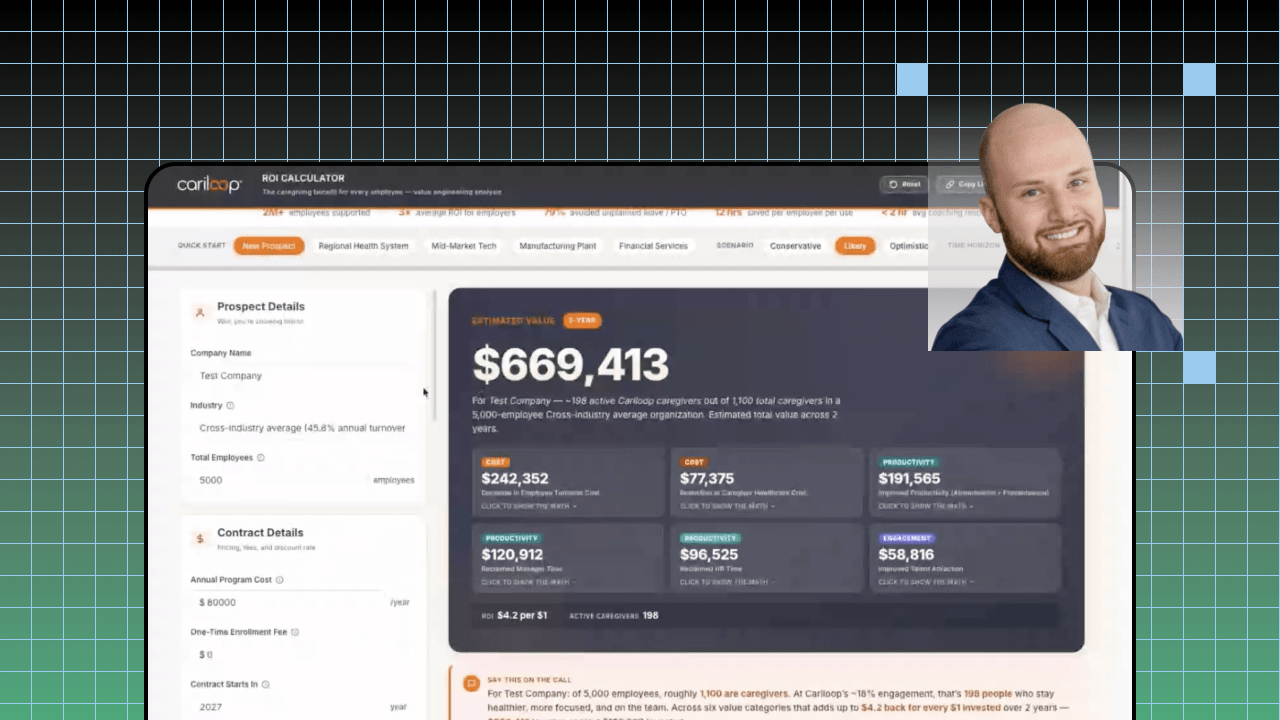
At Domo BUILD 2026, T.C. Riley, senior director of data analytics at Cariloop, walked through exactly how he turned a "spreadsheet from your nightmares" into a live sales ROI app in Domo.
T.C. shared the pain points that made their old Excel approach unsustainable and demonstrated how they rebuilt the entire experience using AI-first techniques. What follows is a practical framework you can use to make the same shift, whether you're on a platform like Domo or tackling this transformation with other tools.
Here's what you need to know about moving from spreadsheet to live sales app:
Before you build anything new, take an honest look at what's broken. T.C. described Cariloop's situation like this: "One workbook, eight tabs, many, many versions. It's out of date by this week. You open one up, I'm not even sure what version this is I'm using." That version chaos creates real problems beyond just confusion.
Start by mapping out where your current ROI process breaks down. Ask yourself these questions:
The last question matters most. If ROI shows up days after the call instead of during it, you're losing momentum at the exact moment your prospect is most engaged.
The shift from spreadsheet to sales app isn't just about better technology. It's about rethinking when and how the tool gets used. "Build for the moment the conversation happens," T.C. said.
That means designing your app around what happens in a live sales call. Your inputs need to be simple enough that a rep can adjust them while maintaining eye contact with a prospect. Your outputs need to be clear enough that a CFO can understand the bottom line at a glance.
Consider these design principles:
T.C. noted that Cariloop's app now generates a clean PDF with one click, meaning "the rep did this live, this thing's out the door before the call ends." That speed changes the entire dynamic of the sales conversation.
Here's a counterintuitive move: instead of hiding your ROI logic behind the scenes, put it front and center. T.C. explained that Cariloop's app shows exactly where benchmarks come from and why they're used, then explicitly encourages prospects to "change these up, fight us on this."
This approach does two things. First, it builds credibility with finance and procurement teams who are naturally skeptical of vendor ROI claims. Second, it keeps the conversation moving because you're collaborating on the numbers rather than defending them.
When you build your app, include these transparency elements:
The goal is to eliminate the "smoke and mirrors" feeling that makes CFOs roll their eyes at vendor calculators.
One of the biggest wins T.C. described wasn't about the app itself. It was about who owns the process now. With the old workbook approach, every ROI request landed as a ticket in the data team's queue. That created bottlenecks and kept the analytics team stuck in a task list instead of doing strategic work.
The new app changes that dynamic entirely. Reps become the owners and experts of the ROI story. They don't need to call the data team as a "phone a friend" lifeline. Everything they need is right there in the app.
To make this shift work, focus on these elements:
When you get this right, your data team stops pumping out workbooks and starts building more apps. T.C. described it as "apps on apps on apps," with the ROI calculator opening the door to client ROI tools, pricing calculators, and coverage maps.
The ultimate test of your spreadsheet-to-app transformation is simple: how fast can you get ROI information into a prospect's hands? If the answer is still "a few days," you haven't solved the core problem.
Set up tracking for these metrics:
Cariloop's transformation took something that had been "sitting on the side of my desk, eating a hole at me for years," according to T.C., and turned it into a live, branded calculator in a matter of days. That kind of time-to-value is possible when you approach the problem with the right framework.
In his session, T.C. also touched on how this transformation opened up a broader app roadmap at Cariloop, including client-facing ROI tools and pricing calculators that had been stuck in Excel for years. The same principles apply across all of them.
If you want to see the full demo and hear T.C. walk through the specific features that made this work, watch the full session. The session was hosted by Domo as part of BUILD 2026, and it's worth your time if you're sitting on a similar spreadsheet problem.